
LangGraph Studio: Why AI Agents Need Their Own IDE
LangChain's LangGraph Studio brings visual debugging, state manipulation, and time-travel to agentic AI development. Here's how the first purpose-built agent IDE changes the way developers build, test, and ship autonomous AI systems.
On this page
TL;DR: LangChain’s LangGraph Studio is a purpose-built IDE for developing AI agents. It offers visual graph inspection, real-time state manipulation, time-travel debugging, and hot-reload iteration. With 43% of LangSmith organizations already sending LangGraph traces and over 34.5 million monthly downloads, the framework is powering agents at Uber, LinkedIn, and JPMorgan. LangGraph Studio tackles the fundamental problem that traditional IDEs weren’t designed for non-linear, stateful, decision-making software. It’s free for all LangSmith users.
LangGraph Studio: Why AI Agents Need Their Own IDE
If you’ve tried debugging an AI agent with print() statements and prayer, you already know the problem LangGraph Studio is trying to solve.
Agents aren’t regular software. They don’t follow predictable paths. They branch based on LLM reasoning, call tools in unexpected orders, loop when they’re uncertain, and sometimes just… wander. Tracing what went wrong in a five-step agent workflow using a standard debugger is like trying to follow a conversation by reading every third word. You get fragments, never the full picture.
LangChain clearly felt this pain too. Their answer: Build an entirely new category of development tool. LangGraph Studio bills itself as the first agent IDE, and after spending time with it, the label holds up.
The core problem: Your IDE wasn’t built for this
Here’s what makes agent debugging so brutal. A traditional application follows a call stack. Function A calls function B, which returns a value, which gets passed to function C. Breakpoints work. Stack traces make sense. The execution path is deterministic, or close enough.
An agentic application? The LLM might decide to call a search tool, then realize it needs a calculator, then go back and re-read the original query, then call a completely different tool it hadn’t considered before. The “call stack” is really a graph with conditional edges, cycles, and state that mutates at every node.
Standard IDEs have no mental model for this. They show you files and line numbers. What you actually need is a way to see the entire graph, understand which path the agent took through it, inspect what the agent was “thinking” at each decision point, and (crucially) change the state and replay from any point to test alternatives.
That’s what LangGraph Studio does.
What you actually get
Visual graph rendering
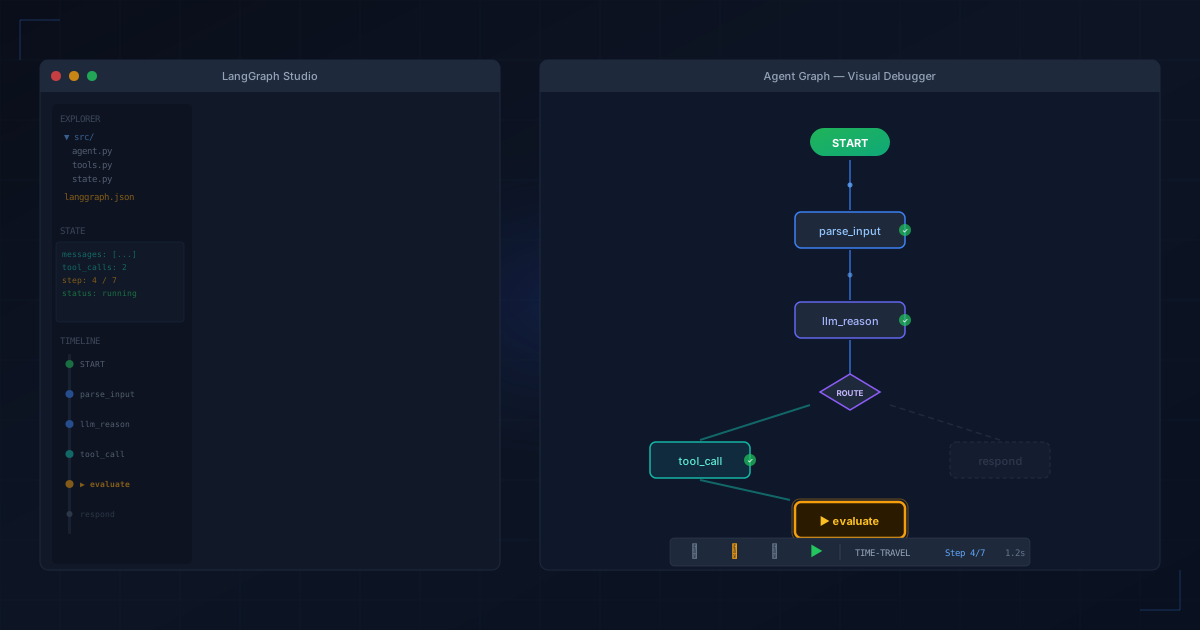
The moment you load a LangGraph project, Studio renders your agent’s architecture as an interactive graph. Nodes represent operations: LLM calls, tool invocations, routing decisions. Edges show the flow between them, including conditional branches.
This isn’t just a static diagram. As your agent runs, the graph lights up in real time. You see which node is currently executing, what data is flowing through each edge, and where the agent has already been. For anyone who’s stared at scrolling terminal logs trying to reconstruct what happened, this is the difference between reading a map and reading GPS coordinates one at a time.
State manipulation mid-execution
This is where things get interesting. At any point during (or after) execution, you can inspect the full agent state: Every variable, every intermediate result, every tool response. You can also edit it.
Want to know what would have happened if the search tool had returned a different result? Swap it out and re-run from that node. Curious whether a different system prompt would have changed the agent’s routing decision? Change it and replay. This kind of counterfactual testing is enormously valuable when you’re trying to make an agent reliable, and it’s nearly impossible to do with traditional tools.
Time-travel debugging
The built-in time-travel feature lets you step backward and forward through an agent’s execution history. You can see what the agent’s state looked like before and after every single node, which means you can pinpoint exactly where things went wrong without re-running the entire workflow.
This matters more than it sounds. Long-running agents might take minutes to execute. Re-running from scratch every time you suspect a problem at step 47 is a productivity killer. Time-travel lets you jump straight to the issue.
Hot reloading
LangGraph Studio watches your code files and automatically picks up changes. Tweak a prompt, save the file, and the studio is ready to re-run with your updated code. No restart, no re-initialization, no waiting for Docker containers to rebuild.
For the iterative “change prompt, test, change again” loop that defines most agent development, this saves a surprising amount of friction.
Interrupt and debug mode
You can interrupt the agent at any time if it’s heading in the wrong direction. You can also run the agent in debug mode, where it pauses after every single step. At each pause, you see the full state, the agent’s next planned action, and you decide whether to let it proceed or intervene.
This is essentially a breakpoint system designed for graph-based execution rather than line-based execution. It works the way agents actually operate.
The numbers behind the momentum
LangGraph isn’t an experiment anymore. The framework crossed 34.5 million monthly downloads and has accumulated over 24,800 GitHub stars. Roughly 43% of organizations using LangSmith (LangChain’s observability platform) are now sending LangGraph traces through the system.
The production adoption list includes names that tend to make enterprise buyers relax: Uber, LinkedIn, Cisco, BlackRock, JPMorgan. About 400 companies are deploying agents on LangGraph Platform in production. With LangGraph 1.0 reaching general availability in late 2025, the framework has graduated from “promising” to “stable enough to bet on.”
LangGraph Studio slots into this ecosystem as the development companion. It integrates directly with LangSmith for observability and collaboration, which means the debugging you do locally in Studio connects to the monitoring you do in production.
Where it fits in the broader space
The tooling around AI agents is maturing fast. 2025 and early 2026 have seen a rush of frameworks and platforms competing for the developer experience layer: CrewAI, AutoGen, Google’s ADK, OpenAI’s Agents SDK. Each makes different trade-offs between simplicity and control.
LangGraph sits on the control-heavy end of that spectrum. It’s a low-level orchestration framework where you define the graph explicitly: Every node, every edge, every state schema. That’s more work upfront than a higher-level framework, but it gives you the kind of fine-grained control that production systems demand.
LangGraph Studio makes that trade-off more palatable. The visual feedback loop compensates for the framework’s steeper learning curve by making the graph structure tangible rather than abstract. You’re not just writing graph definitions in code and hoping the mental model in your head matches reality. You see it.
The broader market context matters too. According to industry data, the AI agent market is projected to grow from $7.38 billion in 2025 to over $100 billion by 2032. About 51% of organizations already run agents in production. Mid-sized companies (100 to 2,000 employees) are the most aggressive adopters, with 63% deploying production agents.
That growth means more developers building agents, which means the debugging problem gets worse, not better. Tools like LangGraph Studio are becoming essential infrastructure.
What’s still missing
No tool review is complete without honesty about the gaps.
LangGraph Studio started as a macOS-only desktop app, specifically Apple Silicon. That’s improved with web-based access through LangSmith Studio, but the experience isn’t identical across platforms. Developers on Linux or Windows may find themselves wanting.
The tool also inherits LangGraph’s own complexity. If you haven’t bought into the LangGraph way of building agents (explicit graphs, typed state schemas, defined nodes and edges) Studio won’t help you. It’s deeply tied to the framework. There’s no “import your arbitrary Python agent code and visualize it” mode.
While the LangSmith integration is useful for teams, it does introduce another service into your stack. Solo developers or small teams might feel the weight of Yet Another Platform, even if the free tier is generous.
Who should pay attention
If you’re building production agents (not toy demos, not weekend hackathon projects, but systems that need to be reliable and debuggable) LangGraph Studio deserves a serious look. The combination of visual debugging, state manipulation, and time-travel is ahead of what any other framework offers for agent development right now.
If you’re already using LangGraph, adopting Studio is a no-brainer. It’s free, it integrates with your existing code, and it will save you hours of debugging time on your first complex workflow.
If you’re evaluating agent frameworks and haven’t picked one yet, LangGraph Studio is a real differentiator. Tooling matters. The best framework is the one where you can actually figure out what went wrong when things break. And things will break.
Agents are different enough from regular software that they need tools built specifically for them. LangGraph Studio is the most complete version of that idea shipping today.
LangGraph Studio is available for free through LangSmith. The LangGraph framework is fully open source and available on GitHub.