
ManyChat alternative: Hosted or self-hosted audience automation?
Find the right ManyChat alternative by comparing pricing, channels, inboxes, migration, and control before choosing self-hosted automation for your audience.

On this page
If your audience is growing and ManyChat’s Active Contact bands are starting to shape the bill, a self-hosted ManyChat alternative can be worth considering. The trade is operational: you give up a fully managed service and take responsibility for the system that handles replies, lead capture, and follow-ups.
The short verdict: choose ManyChat when you want managed hosting, ready-made templates, TikTok access, and AI-powered conversations without running the stack. Choose BrightBean Chat when you want source access, self-hosting, and a software fee that does not change with contact count, and you accept infrastructure work, third-party messaging charges, manual migration, and a pre-1.0 product. BrightBean publishes and maintains BrightBean Chat, so this is a product-owner comparison, not an independent review.
TL;DR
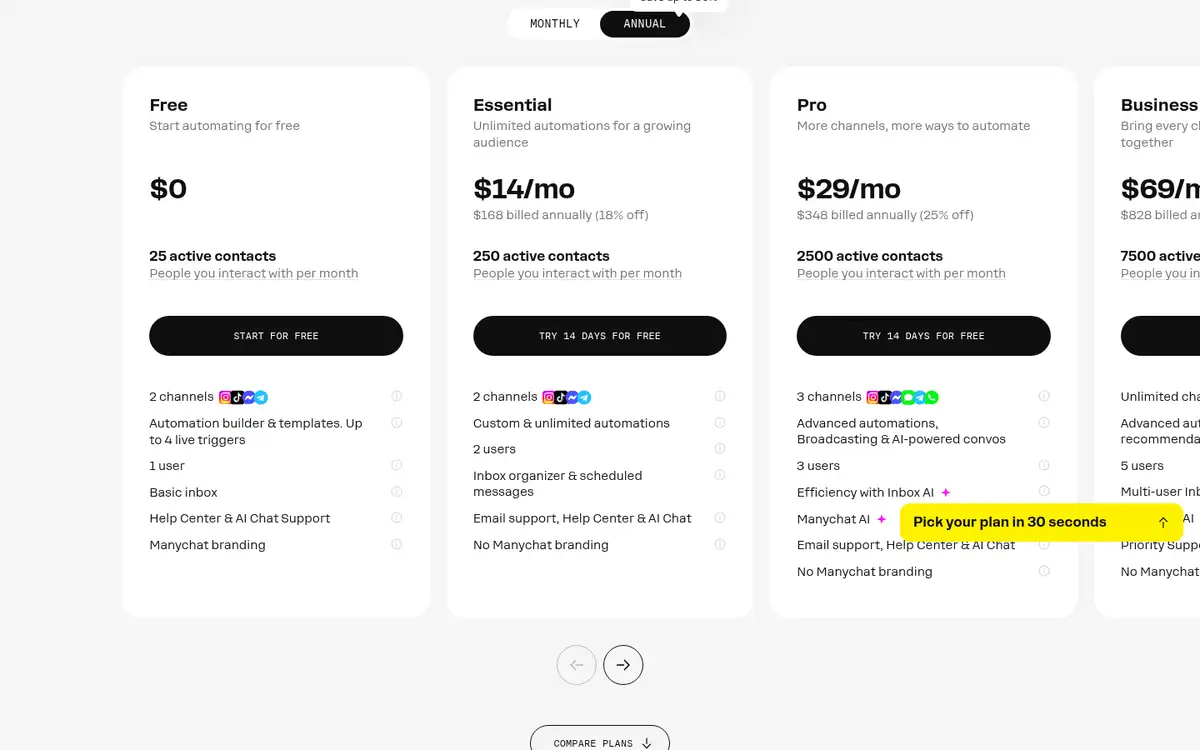
- ManyChat is the managed-service choice: its Free plan starts at $0 for 25 Active Contacts, Essential is $14/month for 250, and Pro is $29/month for 2,500. Essential and Pro include 14-day trials.
- BrightBean Chat’s self-hosted edition is listed at $0/month for the software, with unlimited contacts, flows, seats, workspaces, channels, broadcasts, sequences, and API access. You still provide infrastructure and pay any direct provider charges.
- BrightBean’s hosted tiers are listed but marked coming soon. They should not be treated as current hosted access.
- BrightBean publishes and maintains BrightBean Chat, so this is a product-owner guide rather than an independent review.
- Choose based on the job: managed launch and ecosystem, or control over deployment and contact-based software costs.
The cost model is the first meaningful difference
Prices checked October 2026. The two products charge for different things, so comparing only the first monthly number gives the wrong answer.
| Decision point | ManyChat | BrightBean Chat |
|---|---|---|
| Deployment | Hosted service. The pricing page does not list a self-hosted deployment. | Self-hosted open-source edition listed at $0/month for the software. Hosted tiers are marked coming soon. |
| Starting access | Free: $0, 25 Active Contacts, and up to two eligible channels. Essential: $14/month for 250 contacts. Pro: $29/month for 2,500 contacts. | Self-hosted: $0/month for the software, with unlimited contacts, flows, seats, workspaces, channels, broadcasts, sequences, and API access. |
| Trial | The Free plan needs no card. Essential and Pro have 14-day free trials. | No trial is listed for the self-hosted edition. The planned hosted free tier is not current hosted access. |
| Scaling | Monthly Active Contact bands, with additional-contact charges after the included allowance. | No product-imposed contact meter on the self-hosted edition. Server, database, and messaging-provider costs remain. |
ManyChat defines an Active Contact as a distinct person reached or engaged during a billing month. The same person interacting more than once in that month counts once, but a larger active audience can move you into a higher band or create overage charges. The next listed bands are Business at $69/month for 7,500 Active Contacts and Advanced at $139/month for 25,000. Prices vary by billing country and exclude tax on the pricing page, so checkout is the final check.
ManyChat’s pricing page is useful if you need a managed service and want the vendor to handle deployment. Its cost model is easier to start with, but it is not a flat fee for an audience of any size.
BrightBean Chat’s self-hosted price is $0 for the application; the rest of the operating bill remains yours. The page says you provide the server, database, and channel credentials, and may have direct Twilio, Meta, or email-provider charges. Its planned hosted unlimited tier is listed at $12 per month when billed yearly, or $15 month-to-month, with $144 billed yearly, but the hosted service is marked coming soon. Treat that as a future access path rather than today’s replacement for ManyChat’s hosted plans.
Compare automation, channels, and inboxes
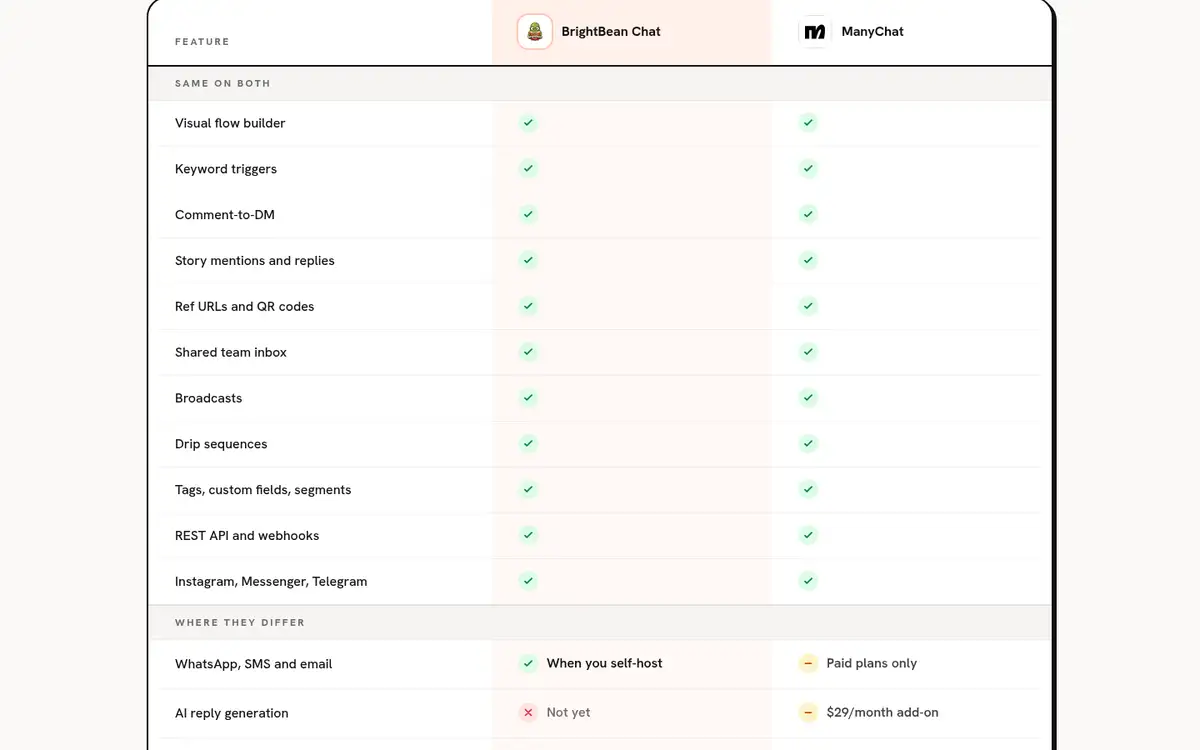
At the workflow level, both products automate the same core jobs. They cover visual flows, keyword triggers, comment-to-DM paths, broadcasts, sequences, audience grouping, inbox work, and API connections. The useful differences are the channel mix, the level of vendor-managed polish, and who controls the system underneath.
What ManyChat gives you
ManyChat lists Instagram, Facebook Messenger, TikTok, and Telegram across its plans, subject to each plan’s channel limit. WhatsApp, SMS, and email appear from Pro upward. Free and Essential allow two eligible channels, Pro allows three, and Business and Advanced allow all eligible channels listed on the page.
The Free plan includes an automation builder with more than 60 templates and up to four live triggers. Pro adds broadcasts and AI-powered conversations, along with training for business information and tone of voice. ManyChat also provides a hosted inbox and paid support tiers. That combination makes it the easier pick when you want to launch flows without learning deployment, database, or backup work first.
What BrightBean Chat gives you
BrightBean Chat documents six channels: Instagram, Facebook Messenger, Telegram, WhatsApp Cloud API, SMS through Twilio, and email through SMTP, Resend, or SES. Its visual builder can send messages, wait, ask questions, branch, split audiences, and save responses. Triggers include keywords, comments, story mentions, ref URLs, and QR codes.
It also documents a shared inbox, team assignment, internal notes, human takeover, broadcasts to segments, drip sequences, tags, custom fields, a REST API, and webhooks. Platform messaging windows and opt-out rules still apply, but the product is designed to skip contacts that cannot be messaged and to pause automation when a person takes over.
The trade-offs are just as important. BrightBean Chat’s current documentation does not include TikTok, and it says AI reply generation is not in v1. The page also acknowledges that BrightBean Chat does not have ManyChat’s template and agency-partner ecosystem. Choose it for control and the documented channel set; ManyChat still has more managed-service conveniences.
Self-hosting changes the job, not just the bill
With ManyChat, the vendor operates the hosted application. With BrightBean Chat’s self-hosted edition, your team supplies the environment that runs it. The product page documents a Docker Compose and PostgreSQL setup, plus production deployment paths using Caddy, Heroku, or Render. It says Redis and a message broker are not required.
That flexibility is useful when you want the application and conversation data on infrastructure you control, or when a contact-based vendor fee does not fit your audience. It also means your team has to own the practical work around that environment: updates, backups, access control, monitoring, and recovery when something fails. BrightBean operates the servers, upgrades, and backups only for the planned hosted tiers, which are currently marked coming soon.
The same distinction applies to provider costs. Self-hosting does not remove charges from Twilio, Meta, or an email provider. It changes who runs the automation layer and where the software fee is applied. The project is also described as pre-1.0, with a recommendation to review its security baseline, start with a low-risk channel, and check the roadmap before moving critical operations. That is a meaningful constraint for a creator whose replies and lead capture cannot afford downtime.
Migration is possible, but it is manual
The concepts are close enough to make a move understandable: keywords, flows, sequences, broadcasts, tags, and custom fields exist in both systems. BrightBean Chat’s page says there is no importer, though, so plan to rebuild rather than export a ManyChat workspace and press a button.
A lower-risk migration looks like this:
- Inventory one workflow. Write down its trigger, message window, questions, data captured, follow-up timing, opt-out path, and human handoff.
- Rebuild one low-risk flow. Start with a comment-to-DM or recurring-question flow instead of moving every broadcast at once. Use the available draft testing and versioned saves before connecting a live audience.
- Test the edges. Check closed messaging windows, opt-outs, duplicate replies, failed provider credentials, and the moment a person takes over. A flow that works in the happy path is not ready until these cases behave correctly.
- Move sequences and broadcasts last. Keep the existing workflow available until the replacement has handled a real but low-risk set of conversations, then migrate the next one.
This is where ManyChat wins even if its pricing model is less attractive: the managed product reduces the amount of infrastructure and migration work your team has to absorb. BrightBean Chat becomes the stronger option when that work is an acceptable price for control.
Who should choose each option?
Choose ManyChat when you want:
- a hosted service that does not require you to run Docker or PostgreSQL;
- ready-made templates and a larger agency ecosystem;
- TikTok support in the documented channel mix;
- AI-powered conversations today; and
- a product team to handle the application environment while you pay according to Active Contacts.
Choose BrightBean Chat when you want:
- an open-source, self-hosted application and the ability to run it on infrastructure you control;
- no product-imposed contact limit on the self-hosted edition;
- the documented Instagram, Messenger, Telegram, WhatsApp, SMS, and email channels;
- a shared inbox, flows, broadcasts, sequences, and API access without waiting for a higher contact tier; and
- a cost model where the application fee is not tied to list size, even though infrastructure and provider costs still exist.
If self-hosting is the requirement but operating a server is not realistic, BrightBean Chat is not yet a drop-in hosted answer: its hosted tiers are marked coming soon. In that situation, ManyChat is the practical choice today, or you can wait until a managed BrightBean Chat path is available and recheck its terms.
Frequently asked questions
Is ManyChat self-hosted?
No. ManyChat’s pricing page lists hosted plans and does not list a self-hosted deployment. If you need to run the application and its data on infrastructure you control, BrightBean Chat’s self-hosted edition is the relevant option in this comparison.
Is BrightBean Chat really free?
The self-hosted software is listed at $0/month, with infrastructure and direct messaging-provider costs left to the operator. That is different from a free managed service, and BrightBean’s hosted tiers are currently marked coming soon.
Which option is cheaper as an audience grows?
There is no universal winner. ManyChat charges by monthly Active Contact bands and lists overage rates, while BrightBean Chat’s self-hosted edition does not impose a contact fee but requires you to pay for and operate the surrounding infrastructure. Compare the vendor bill with the value of the time and risk your team is willing to own.
The decision is simple once the constraint is clear: choose ManyChat for a managed launch and a broader ready-made ecosystem; choose BrightBean Chat when self-hosted control and contact-count independence matter more than avoiding operational work.
Sources
- ManyChat pricing: https://manychat.com/pricing. Official pricing page detailing hosted plans, Active Contact limits, channels, trials, overages, and user and inbox allowances.
- BrightBean Chat: https://brightbean.xyz/chat/. Official product page documenting the self-hosted and planned hosted editions, channels, flow builder, inbox, pricing, deployment, migration, and pre-1.0 limitations.