
ManyChat pricing 2026: Hosted plans vs self-hosted automation
ManyChat pricing 2026 explained: Compare active-contact costs, hosted plans, and BrightBean Chat's self-hosted option before choosing your automation setup.

On this page
When recurring comments, DMs, lead capture, and follow-ups start taking over a Solo Founder’s day, ManyChat pricing looks simple on the surface. ManyChat has a $0 plan, then paid tiers from $17/month for 250 Active Contacts to $199/month for 25,000 on monthly billing. The bill can grow with extra active contacts.
A self-hosted route changes the cost model. BrightBean Chat’s software is $0/month from BrightBean, while the infrastructure and messaging-provider charges stay with you. BrightBean Chat is our own product, so this comparison gives it the same scrutiny as ManyChat. The short version: Choose ManyChat for managed convenience; consider self-hosting when contact-based billing and control outweigh the work of operating the system.
TL;DR
- ManyChat Free costs $0 and includes 25 Active Contacts per month, two channels, and four live triggers. Essential starts at $17/month or $14/month when billed annually, while Advanced reaches $199/month or $139/month annually.
- ManyChat counts a unique person who interacts with messages, automations, broadcasts, AI, or the Inbox as an Active Contact for that billing month. Paid tiers can charge for contacts above the allowance.
- BrightBean Chat’s self-hosted build costs $0/month from BrightBean, with no product-imposed contact cap, but you provide infrastructure and pay messaging providers directly.
- BrightBean Chat Hosted Unlimited costs $15/month or $12/month when billed annually per workspace. It removes server administration, but the Chat page explicitly names Instagram, Facebook Messenger, and Telegram for that hosted tier.
ManyChat pricing in 2026: The five plans
Prices checked November 2026. The figures below come from Manychat’s official pricing page, which shows U.S. dollar prices before tax and says the final country-specific price appears at checkout. Annual billing is advertised as saving up to 30%.
| Plan | Monthly billing | Annual billing | Active Contacts | Channels and access |
|---|---|---|---|---|
| Free | $0 | $0 | 25/month | Up to 2 from Instagram, TikTok, Facebook Messenger, and Telegram; no card required; Manychat branding in the first message |
| Essential | $17/month | $14/month ($168/year) | 250/month | 2 eligible channels; 14-day free trial |
| Pro | $39/month | $29/month ($348/year) | 2,500/month | 3 of 7 eligible channels; 14-day free trial |
| Business | $99/month | $69/month ($828/year) | 7,500/month | All eligible channels; no separate trial stated on the pricing page |
| Advanced | $199/month | $139/month ($1,668/year) | 25,000/month | All eligible channels; no separate trial stated on the pricing page |
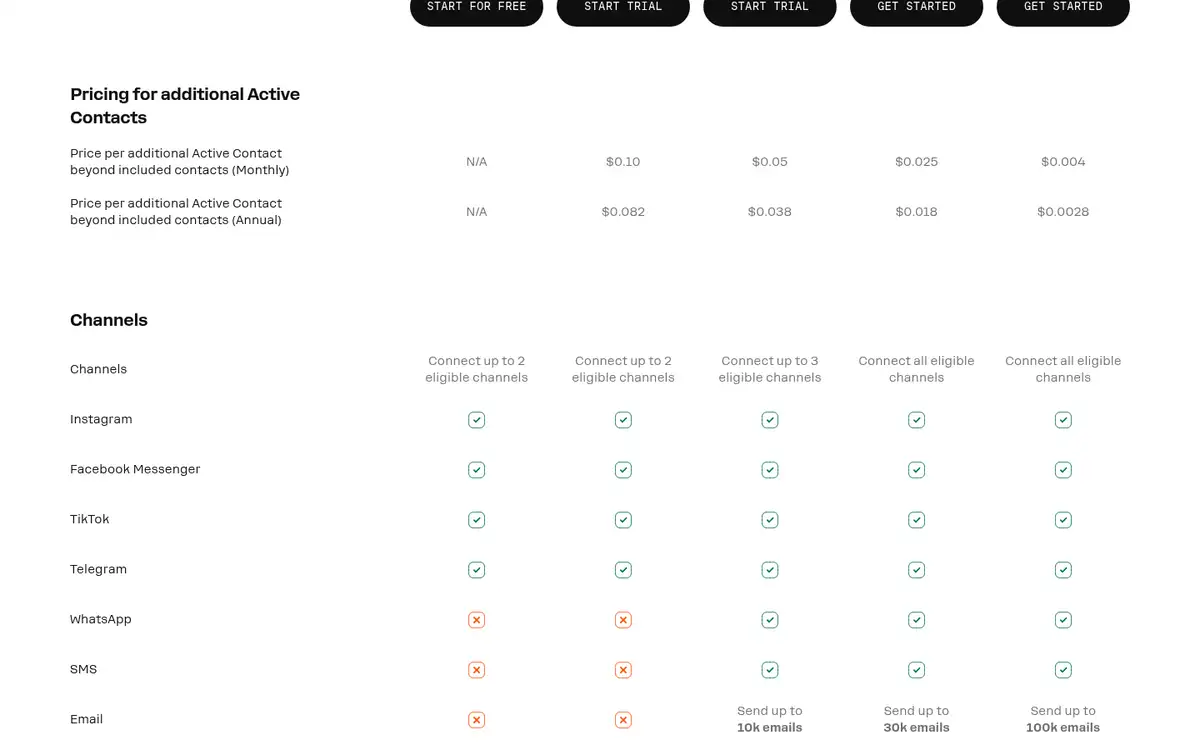
The four channels available on Free and Essential are Instagram, TikTok, Facebook Messenger, and Telegram. Pro adds WhatsApp, SMS, and email to the eligible list and lets you select three channels; Business and Advanced list all eligible channels. Essential and Pro are the plans for which the page lists a 14-day free trial. The Free plan does not require a card, while paid plans do.
Free also has four live triggers, a basic inbox, and Manychat branding in the first message. Pro adds advanced automations, broadcasts, and AI-powered conversations. Business and Advanced add more Active Contacts, users, and Inbox seats rather than changing the basic pricing model.
How ManyChat’s Active Contact billing works
An Active Contact is a unique person Manychat interacts with during a monthly billing period. If the same person sends several messages or enters several automations in that month, they count once. Messages from automations, AI, broadcasts, or the Inbox can make a contact active.
Annual subscribers are still measured month by month, and overage charges are billed monthly. Automations do not stop automatically when the included allowance is exceeded. Manychat says it warns customers as they approach the limit and lets them set an overage threshold that controls whether more contacts are allowed.
The pricing page lists these rates for contacts above the included allowance:
| Paid tier | Extra contact on monthly billing | Extra contact on annual billing |
|---|---|---|
| Essential | $0.10 | $0.082 |
| Pro | $0.05 | $0.038 |
| Business | $0.025 | $0.018 |
| Advanced | $0.004 | $0.0028 |
Here is the part worth putting in a spreadsheet. If a Pro account reaches 3,000 Active Contacts in one month, 500 are above its 2,500-contact allowance. At the listed monthly overage rate, those contacts add $25, taking that month’s base bill from $39 to $64 before tax. On the annual plan, the same 500 contacts would add $19 at the listed annual overage rate, on top of the plan’s $348 annual charge.
That variable line matters more than the headline price for a business that runs regular broadcasts or receives a growing stream of conversations. ManyChat’s model can be perfectly predictable at a stable contact volume, but it deserves a monthly contact forecast before you compare it with a flat workspace price.
What BrightBean Chat costs when you host it yourself
BrightBean Chat is our own conversation-automation product and a genuine candidate for this comparison. It covers the same core job with visual flows, comment-to-DM automation, broadcasts, sequences, a shared inbox, tags and segments, a REST API, and webhooks. Its pricing depends on whether you want to operate the service or have BrightBean operate it.
| BrightBean Chat path | BrightBean price | Included access | Cost or limit to remember |
|---|---|---|---|
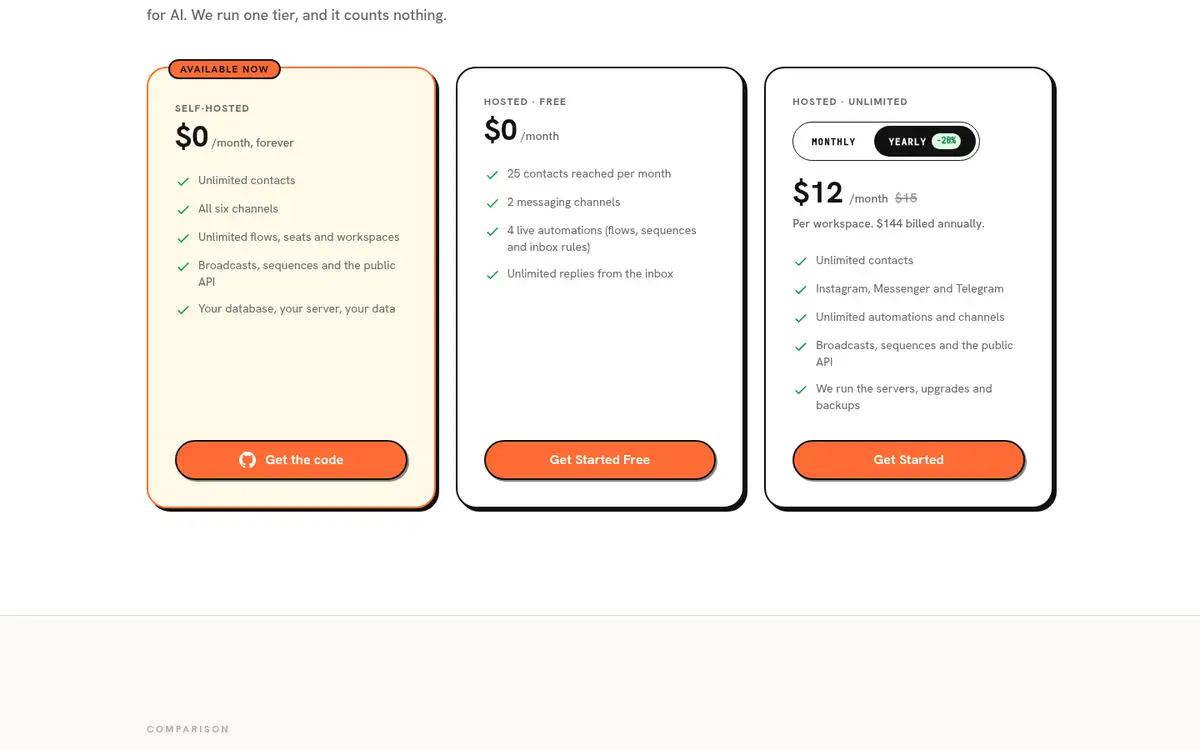
| Self-hosted | $0/month from BrightBean | Unlimited contacts, flows, seats, and workspaces; six channel adapters; broadcasts, sequences, and the public API | You provide the infrastructure and pay messaging providers directly |
| Hosted Free | $0/month | 25 contacts reached per month, 2 messaging channels, 4 live automations, and unlimited inbox replies | The hosted plan limits apply |
| Hosted Unlimited | $15/month monthly, or $12/month when billed annually ($144/year) | Unlimited contacts, automations, and channels at the plan level; public API; BrightBean-managed servers, upgrades, and backups | The page explicitly names Instagram, Facebook Messenger, and Telegram for this hosted tier; third-party message-delivery charges are not included |
The six self-hosted adapters are Instagram, Facebook Messenger, Telegram, WhatsApp, SMS, and email. That list should not be copied wholesale onto Hosted Unlimited: the current Chat page names three hosted channels, so confirm availability for the channel mix you need.
Self-hosted does not mean cost-free in total. The Chat page documents a container-based deployment with PostgreSQL, but it does not publish a typical infrastructure or message-delivery total. Your server, maintenance time, and provider bills depend on the setup you choose. The $0 figure is the software charge from BrightBean.
Hosted and self-hosted automation use different trade-offs
The price comparison is easier to use when every option is judged on the same questions.
| Decision point | ManyChat | BrightBean Chat |
|---|---|---|
| Billing | Hosted plans are tied to monthly Active Contacts, with overage rates above the allowance | Self-hosted has no product-imposed contact cap; hosted plans are priced per workspace |
| Hosting | ManyChat is a hosted subscription; the pricing page does not list a self-hosted deployment | Choose self-hosting or BrightBean-managed hosting |
| Channels | Free and Essential offer 2 from 4; Pro offers 3 from 7; Business and Advanced list all eligible channels | Self-hosted lists 6 adapters; Hosted Unlimited explicitly names Instagram, Facebook Messenger, and Telegram |
| Automation | Custom automations, templates, broadcasts, and AI-powered conversations are available by tier; inbox seats vary by plan | Flows, triggers, broadcasts, sequences, shared inbox, human takeover, tags, segments, API, and webhooks are documented on the Chat page |
| Control | The vendor runs the service, and no customer-controlled server path is listed | Self-hosting puts the application, database, and data on infrastructure you control; hosted plans move operations to BrightBean |
| Gaps to weigh | The bill follows contact volume, and self-hosting is not an option | No AI reply generation or template library is documented, and if you move from ManyChat, workflows must currently be rebuilt manually because there is no importer |
ManyChat’s advantage is operational simplicity. You pay for a hosted product, select the channels your plan allows, and get a set of templates and AI-powered conversation features as you move up the tiers. The trade is a contact-metered bill and no self-hosted path.
BrightBean Chat’s advantage is control and a different billing shape. The self-hosted build removes the product’s contact cap and includes all six adapters listed on the page, but it puts deployment, maintenance, and provider relationships on your side. Hosted BrightBean Chat is the middle route: BrightBean manages the servers, upgrades, and backups, while you still need to check the hosted channel list and account for message-delivery charges.
Which option fits a Solo Founder?
Choose ManyChat when the job is to get a managed conversation system running without taking on infrastructure. It is the stronger default if 60-plus templates, AI-powered conversations, the Inbox, and a hosted setup matter more than keeping a contact-based bill out of the model. Forecast the Active Contacts before choosing a plan, especially if broadcasts or lead magnets could make many people active in one month.
Choose BrightBean Chat self-hosted when you want control over the application and data, need the six self-hosted channel adapters, and are prepared to own infrastructure and direct provider charges. It is a poor fit if running and maintaining a server is exactly the work you are trying to remove.
Choose Hosted Unlimited when you want BrightBean to run the servers and still want a per-workspace price with unlimited contacts at the plan level. It may be the practical middle ground, but verify that the explicitly named hosted channels match your workflow. The verdict changes when AI reply generation, templates, or a zero-operations setup becomes more important than contact economics and control.
Frequently asked questions
How much does ManyChat cost per month?
ManyChat has a Free plan at $0. Its paid monthly plans are $17 for Essential, $39 for Pro, $99 for Business, and $199 for Advanced; annual billing reduces the effective monthly prices to $14, $29, $69, and $139, billed yearly. Active-contact overages can add to the bill, and final prices can vary by country and tax.
Is there a better app than ManyChat?
There is a better fit for different operating preferences. ManyChat suits a founder who wants hosted automation, templates, and AI-powered conversation features; BrightBean Chat is a candidate for someone who values self-hosting, control, and no product-imposed contact cap. Self-hosting is not automatically cheaper after infrastructure, maintenance, and message-delivery charges.
What is ManyChat good for?
ManyChat is built for hosted automation around comments, direct messages, lead capture, follow-ups, broadcasts, and inbox conversations across supported social and messaging channels. Its plan determines which channels, contact allowance, automation features, AI features, and inbox capacity you get.
How do I cancel my ManyChat subscription?
Manychat’s current pricing page says you can cancel at any time. It also says purchases canceled within 30 days may qualify for a refund through support. The page confirms the policy but does not give a full click-by-click cancellation path, so use the account billing controls or Manychat’s Help Center if you need the exact steps.
Sources
- Manychat pricing: https://manychat.com/pricing. The official pricing page lists the Free, Essential, Pro, Business, and Advanced tiers, Active Contact definitions and overage rates, channel access, trials, cancellation, and billing terms.
- BrightBean Chat: https://brightbean.xyz/chat/. The official Chat page documents self-hosted software pricing, hosted Free and Hosted Unlimited prices and limits, channel availability, automation features, and infrastructure and messaging-provider responsibilities.