
Explorer
A searchable file tree next to an interactive knowledge graph. Hover a node to trace what it connects to, click it to read or edit. Useful when you want to know why an agent wrote something the way it did.
BrightBean researches, creates, publishes and improves high-quality content, so impressions and leads keep growing while you focus on the business.
No card required


01 · Brand intelligence
BrightBean learns your voice, audience, positioning, proof and visual style before it writes. That context keeps automated content specific, consistent and unmistakably yours.
A searchable file tree next to an interactive knowledge graph. Hover a node to trace what it connects to, click it to read or edit. Useful when you want to know why an agent wrote something the way it did.
Five cards that define the company: Soul, Style, Positioning, ICP and Pitch. Each one is editable, and each edit routes through approval so two people can't quietly disagree about the voice.
Upload real brand photography as reference images. Generated visuals draw on them, so the output looks like your company rather than like stock AI art.
Reference documents agents draw on whenever they write: PDF, Word, plain text, Markdown and CSV, up to 10 MB each. Product docs, research and past campaigns keep every draft grounded.
A reverse-chronological feed of what BrightBean has learned from your results, each with the delta that triggered it and an Applied or Reverted status. Disagree with one? Revert it in a click.
Per-channel rules the system has earned: which formats win on LinkedIn, which hooks land on Reddit and which posting windows are worth testing. This is what makes the tenth post better than the first.
02 · Creation
One draft, two ways to work on it, and a preview for every network it's going to.
Ask for a change in chat, or type it yourself in the composer, both tabs edit the same post. Switch mid-sentence without losing anything.
The publish button is a split control with four delivery modes, and it respects your role, if you can't publish, it reads "Send for approval" instead.
Reddit, Hacker News, Indie Hackers and launch emails all reward being posted by a human. BrightBean drafts those in a manual composer and hands them over ready to paste, so they stay part of the same plan instead of living in someone's notes app.
03 · Scheduling
Separate calendars for social and blog, both showing every connected account in one place.
 Pricing
 Tiers
Tiers
 BTS
BTS
 How we
Open
How we
Open
 Reply
Open
Reply
Open
 Short
Short
Zoom out to see the quarter's rhythm, or into a single day to fix a clash.
Move a post to another slot by dragging it. No dialog, no re-approval.
By status, channel, tag and timezone, so a five-account week stays readable.
Your posting schedule shows its unfilled slots on the calendar, so gaps are obvious.
Each connected account gets its own seven-day grid of time slots. Set "LinkedIn, weekdays, 9am and 4pm" once and every post routed to Next available lands there. The same page shows account health and lets you disconnect.
04 · Long-form
Everything between "we should write about this" and "it's live on the site", inside one workspace.

Calendar or list view of everything planned, drafted and published. The editor pairs a rich-text canvas with a chat tab, a metadata panel for slug, category and tags, an AI-generated featured image, and a Sources list showing what the article was grounded in.

Three ways in, Ask for live SERP and volume research, run a Playbook, or just Add keywords you already know. Candidates collect in a shared workbench; approve the good ones and schedule them straight onto free days.

A curated catalog of 56 directories across five groups, General, SaaS, AI, Industry and Germany. BrightBean writes each listing from your approved brand context, in the right language, and tracks which ones you've submitted. You still submit them yourself.

A searchable table of every article you've published. Open any row and the same composer becomes a rewriter, refresh the piece, then republish it in place at the original URL.
Publishes articles to
WordPress
WordPress.com
 Ghost
Ghost
 Webflow
 Shopify
 Wix
Wix
 Framer
 Notion
 Git site
 Webhook
 Local folder
05 · Control
One queue for everything waiting on a human, tabbed by All, Social, Blog and Brand. Approve in bulk, or open a drawer to read the full artifact first.

See the post as each network will render it before it goes anywhere.
Read the full piece with its sources, then approve or send it back.
Proposed edits to your knowledge, shown as plain-English before and after, not a diff you have to decode.
06 · Engage
Comments, mentions and DMs from your channels land in one feed, so nobody has to check six apps to keep up. Your team sorts them, answers them and marks them done without leaving BrightBean.
Pulls in from
 Facebook
Instagram
LinkedIn Pages
YouTube
Facebook
Instagram
LinkedIn Pages
YouTube
 Bluesky
 Mastodon
 Telegram
Comments, mentions and DMs arrive together, each tagged positive, neutral or negative. It syncs through the day, and straight away when you hit refresh.
Assign a message, leave an internal note, then resolve or archive it. Filter by type, status or sentiment, and clear up to 200 at once.
Reply without leaving BrightBean, keep saved replies for the questions you get every week, and set a response-time target so nothing waits too long.
The inbox uses no credits, so it works on every plan, Free included.
07 · Results compounding
See the impressions, reach, clicks and search growth your content creates. BrightBean turns those signals into better next drafts automatically.
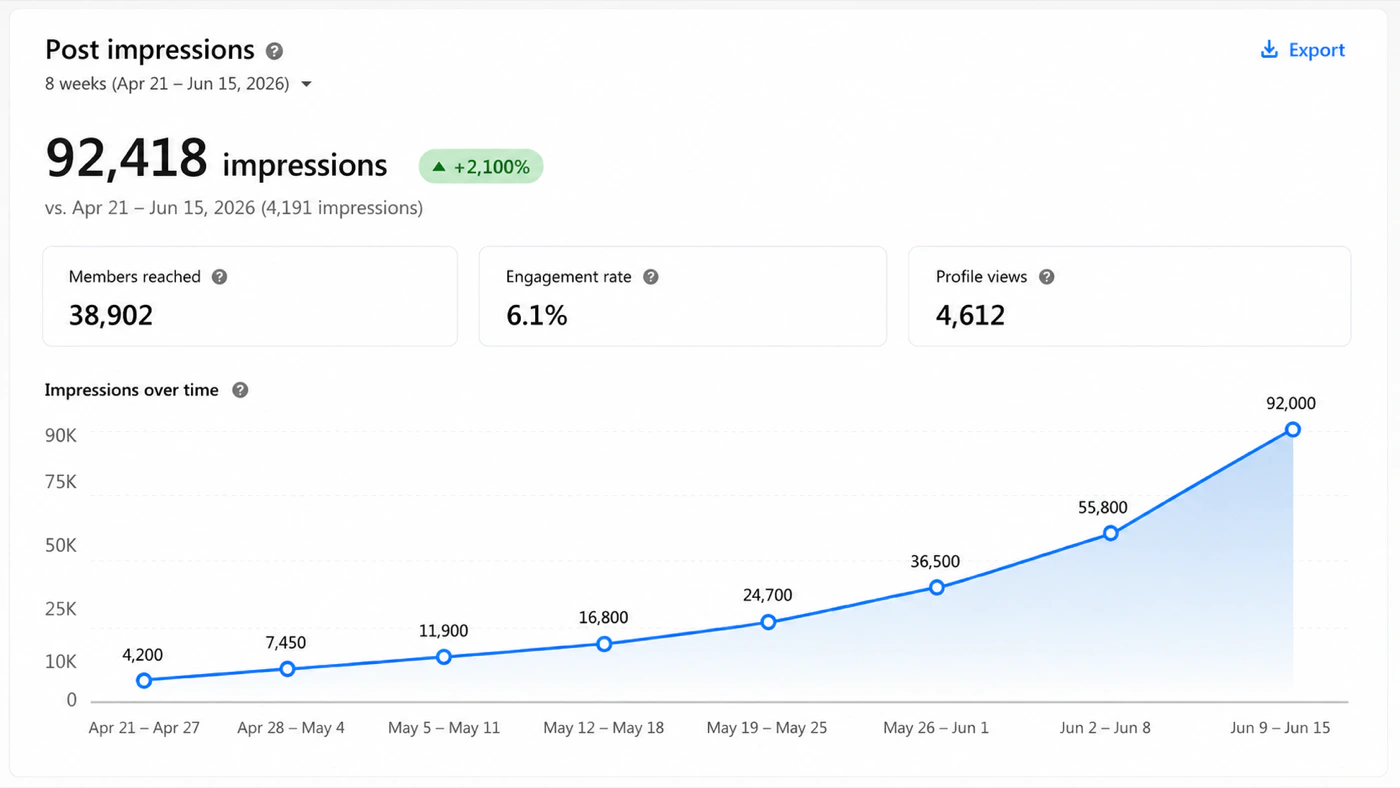 LinkedIn
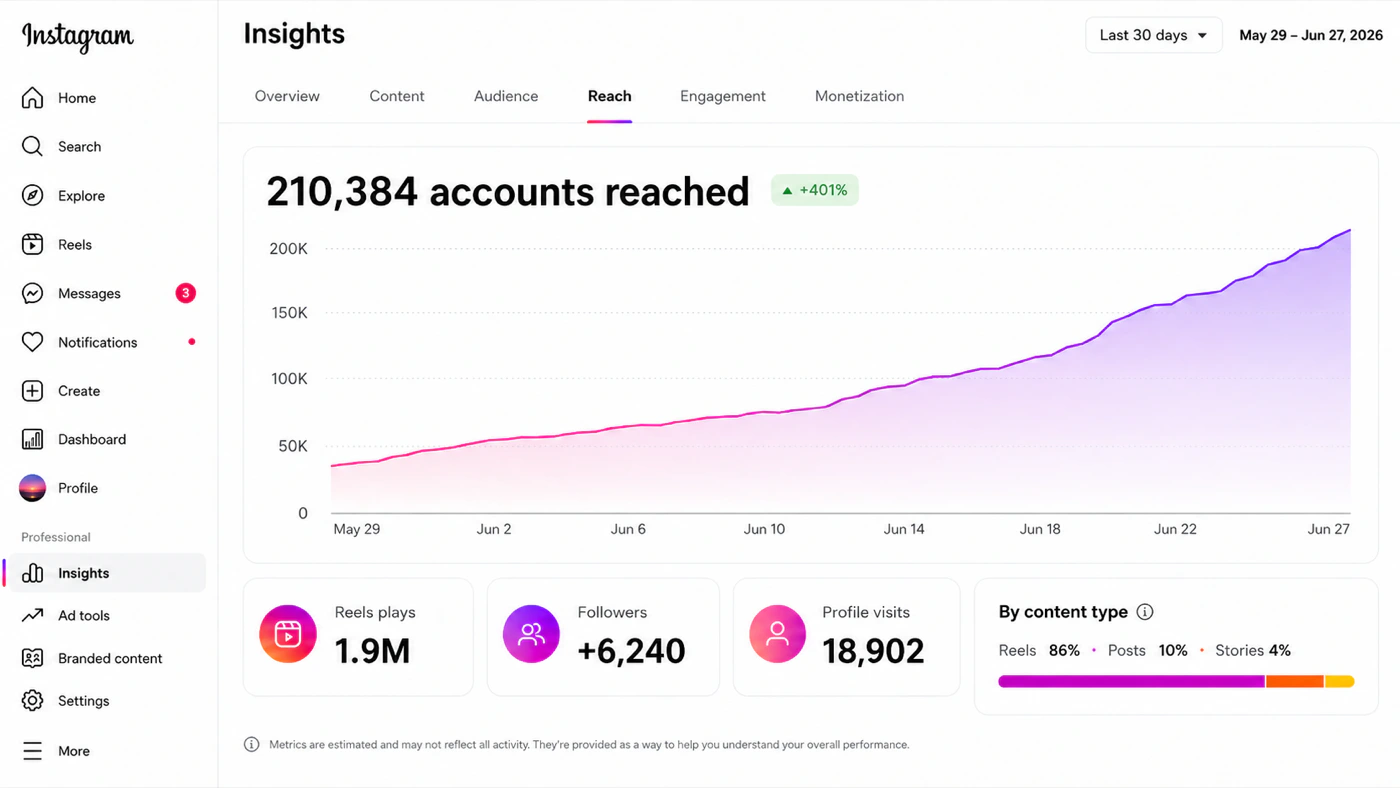 Instagram
Performance data turns into candidate learnings, "carousels outperform single images on LinkedIn by 2.4×", which land in your review inbox as proposals. Approve one and every future draft accounts for it. Revert it later and they stop.
Google Analytics 4 connects by granting access to a service account BrightBean provisions for your workspace, so there are no keys to manage.
08 · Bring your own agent
BrightBean works in the browser on its own. If your team already pays for a coding agent, you can run it on that instead.
$ claude
brightbean mcp connected · brand, social, blog
› draft this week in our brand voice
• reading identity, voice, playbooks…
✓ 4 posts + 1 article queued for review
Runs on the agent you already pay for
 Claude
 Codex
Codex
 Cursor
 OpenClaw
 Hermes
 LangGraph
No second AI bill. Your brand context, channels and blog are exposed through MCP, so whatever speaks MCP can drive them.
Your brand context, social accounts, crawler, blog and improvement loop are exposed through MCP, so any MCP-speaking client can drive them.
A macOS app runs your own Claude Code or Codex CLI against those servers over stdio. Your subscription, your machine, your keys, and a Local folder connector for static sites.
Research falls through four tiers, plain fetch, public extractors, browser rendering, then a full browser on a residential proxy, so pages that block scrapers still come back.
09 · API and MCP
What you do with posts in BrightBean, an agent can do too. Scripts, Zapier, n8n, Claude or your own agent can read your channels, create drafts, schedule or publish posts, upload media and pull analytics.
Endpoints for accounts, posts, media and analytics, with an OpenAPI reference. Each key is limited to the channels and permissions you pick, and can expire on a date you set.
Add BrightBean to Claude, or any MCP client, and sign in with OAuth. You choose the workspace, the channels and what it is allowed to do.
Publishing is off by default. Anything an agent schedules without that permission waits in your review inbox, labelled with the key or app that sent it.
10 · Connections
Eleven social networks to publish to, eleven ways to get an article onto your own site, and three data sources feeding the loop.
11 networks
LinkedIn
Instagram
Facebook
Threads
 TikTok
YouTube
TikTok
YouTube
 Pinterest
Bluesky
Mastodon
Pinterest
Bluesky
Mastodon
 DEV.to
Telegram
DEV.to
Telegram
11 connectors
WordPress
WordPress.com
Ghost
Webflow
Shopify
Wix
Framer
Notion
Git site
Webhook
Local folder
2 sources
Building on YouTube specifically? The BrightBean Intelligence API scores titles, thumbnails and hooks, and ships as a REST API and MCP server.
11 · Setup and teams
Who am I · Voice & style · Connect. Add links, upload files, or write a few sentences, whatever you have. BrightBean fills in the brand context from there.
Owner, Admin, Member and Viewer, with invites per organisation. Publishing rights are a permission, which is what makes the review inbox meaningful.
One organisation can run several workspaces, each with its own brand context, connections and blog settings. Useful for agencies, sub-brands and separate markets. Free workspaces are unlimited, and you pay only for the ones you upgrade.

Keep high-quality content shipping, impressions growing and leads coming in, while you focus on the rest of the business.
Free plan available. No credit card required.
We use optional cookies to understand how this site gets used and whether our ads work. Nothing optional loads until you choose, and declining changes nothing about how the site works.
There are exactly two optional things on this website. Here they are, in full.
One entry: your answer to this question. We keep it in your browser's local storage under
bb_consent for 180 days so we don't ask
again. It never leaves your device and identifies nothing about you. That is the entire
list.
| Cookie | Purpose | Duration |
|---|---|---|
| _ga | Random ID so repeat visits count as one person | 180 days |
| _ga_* | Keeps the analytics session state | 180 days |
| Cookie | Purpose | Duration |
|---|---|---|
| __oppref | Which OpenAI ad brought you here, if any | 30 days |
| __obref | Recognises your browser so a later sign-up can be matched to an ad | 1 year, deleted when you withdraw consent |
Full detail in our Privacy Policy and Legal Notice.