
Online marketing tools for small business: Six options by need
Compare online marketing tools for small business by workflow, handoffs, pricing, free plans, and fit, from social publishing to CRM follow-up.

On this page
A campaign brief that moves from a spreadsheet to a writing tool, then a scheduler and finally an analytics report is a familiar small-team tax. The best online marketing tools for small business remove one of those moves without creating a new admin job.
Start with BrightBean when you want one shared workflow from planning through performance learning. Choose Buffer for straightforward social publishing, Constant Contact for turning social attention into email and SMS relationships, Metricool for reporting, HubSpot when the CRM should drive follow-up, and Zapier when the gaps sit between otherwise good tools.
Prices checked November 2026. Pricing varies by channels, contacts, seats, brands, tasks, or credits, so the entry price is a screening figure rather than a forecast of your bill.
TL;DR
- Broadest workflow: BrightBean connects planning, creation, publishing, and performance feedback.
- Simplest social publishing: Buffer is the lightest choice for a small channel set.
- Social to email: Constant Contact carries contacts into email, SMS, forms, and automation.
- Reporting: Metricool is the specialist pick for analytics and shareable reports.
- CRM or app handoffs: HubSpot fits an existing CRM process; Zapier connects a stack that already works.
How this comparison works
This comparison stays with six tools rather than trying to catalogue every platform that calls itself a marketing tool. The shortlist covers the handoffs a small team is most likely to feel: planning into production, production into publishing, social attention into an owned audience, publishing into measurement, marketing into CRM follow-up, and data moving between separate apps.
Each tool is judged on the same questions: what job it handles, which handoff it removes, what it does not cover, who should choose it, and what the current entry price includes. The order follows the handoff rather than a universal ranking. A tool can be a poor first purchase and still be the right answer to one specific bottleneck.
At a glance: six tools by the handoff they remove
| Tool | Best fit | Handoff it removes | What it covers | Free or trial; entry paid price | Main trade-off |
|---|---|---|---|---|---|
| BrightBean | Small teams wanting one connected marketing workflow | Plan to create to publish to learn | Social and blog planning, AI-assisted creation, publishing, approvals, analytics feedback, optional Chat Automation | Free forever; 7-day Pro trial for $7; Pro from $119 per workspace/month | AI work uses credits and starts in trial or paid access |
| Buffer | Teams that mainly need consistent social publishing | Draft to multiple social channels | Calendar, queues, publishing, community inbox, AI assistance, insights | Free for up to 3 channels; paid plans from $5 per channel/month; 14-day trial | Per-channel pricing; limited CRM and SEO workflow |
| Constant Contact | Small businesses building an email list from social activity | Social attention to email, SMS, or events | Email, social posting, forms, events, SMS, automation, reporting | No free-forever plan stated; 30-day free trial; Lite from $12/month | Contact and send limits; lighter social listening |
| Metricool | Teams that spend too long assembling reports | Publishing to measurement | Scheduling, inbox, competitor research, analytics, PDF/PPT reports | Free for 1 brand and 20 scheduled posts/month; Starter displayed from $20-$25/month | Approvals and stronger team controls begin on Advanced |
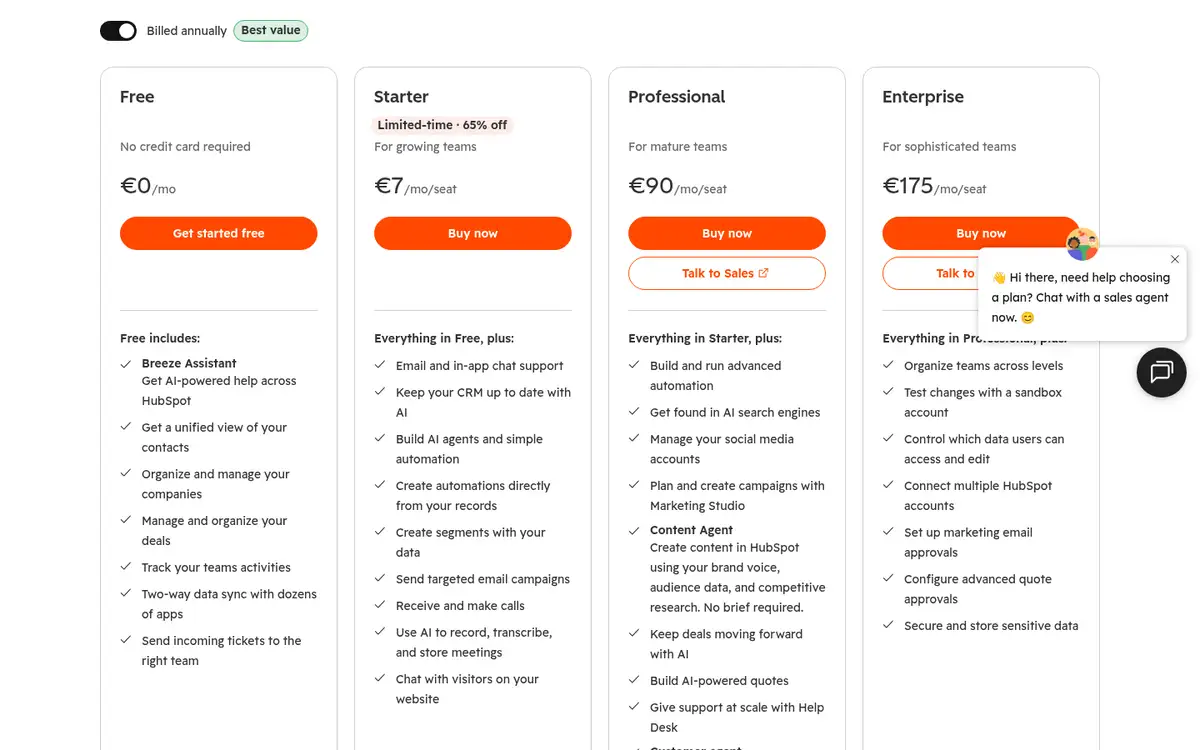
| HubSpot | Businesses already running marketing through a CRM | Marketing activity to lead follow-up | CRM, email, automation, segmentation, social management at Professional, reporting | Free CRM; Starter displayed from €7/seat/month; Professional from €90/seat/month in the current euro view | Social management sits higher in the plan structure |
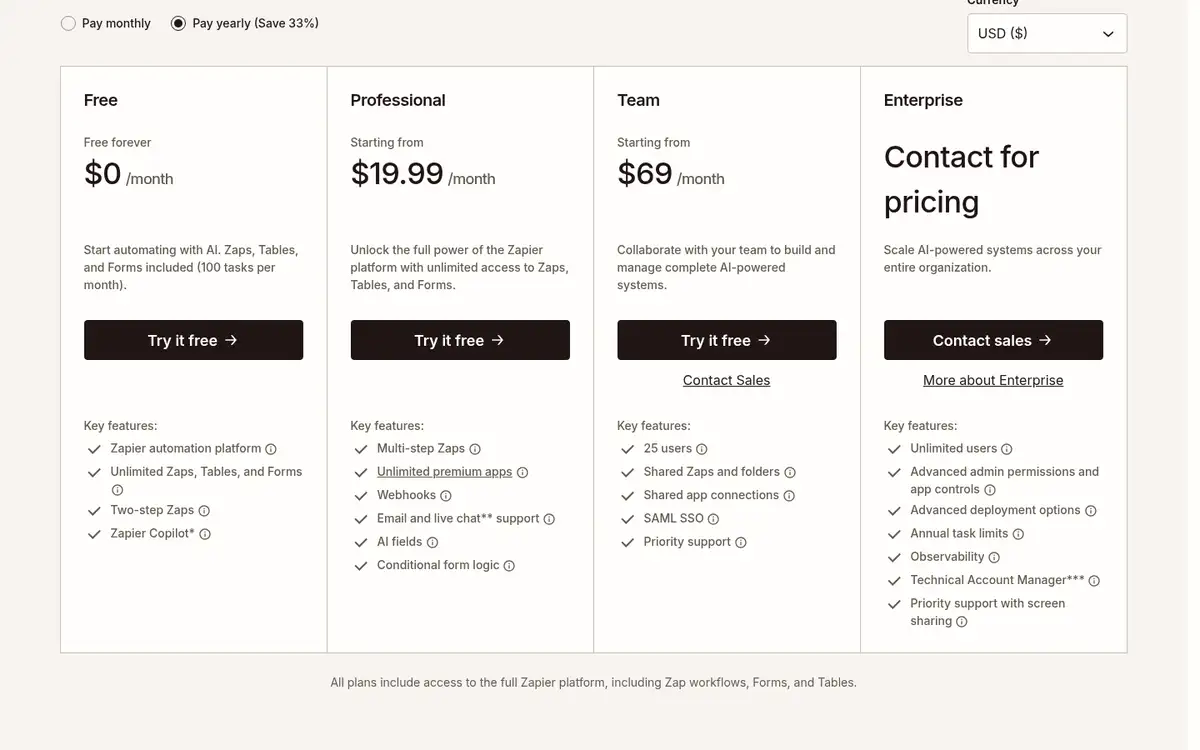
| Zapier | Teams joining specialist apps together | App to app data transfer | Triggers, multi-step workflows, forms, tables, AI-assisted automation | Free for 100 tasks/month; Professional from $19.99/month; 14-day trial | No native marketing calendar, inbox, or campaign analytics |
BrightBean: Connect planning, creation, publishing, and learning
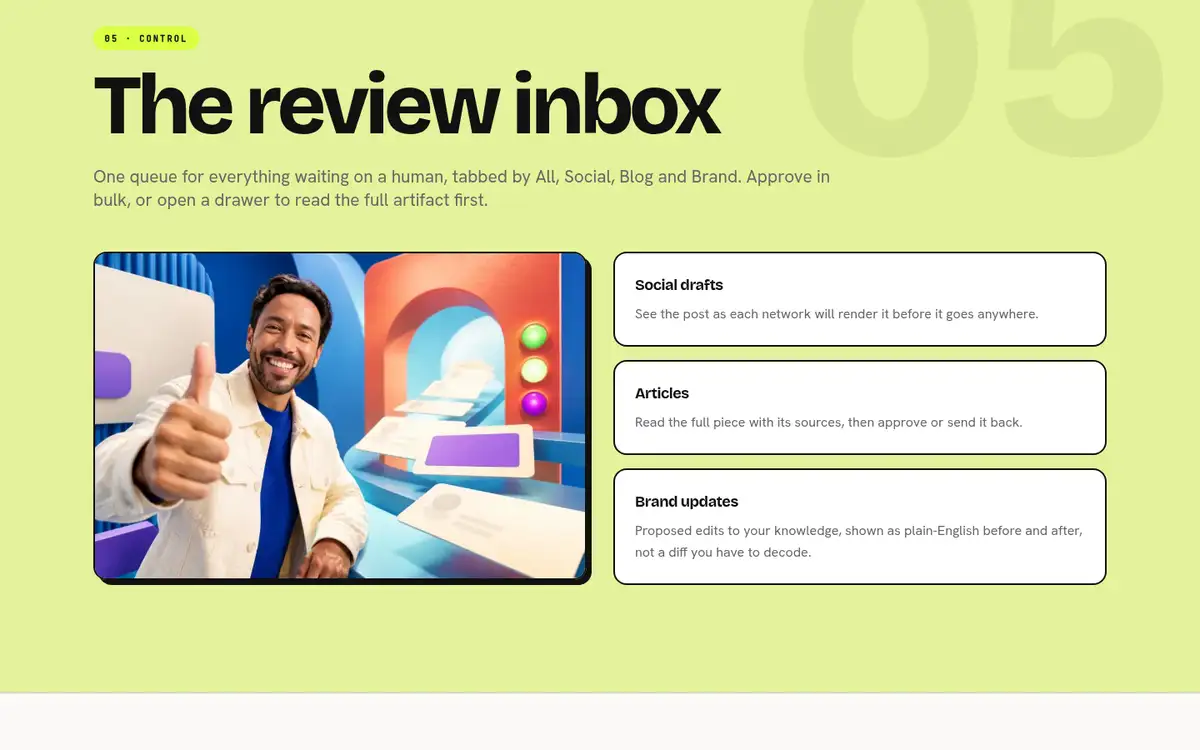
BrightBean is our product, and it belongs in this comparison because it addresses the widest handoff in the brief: the movement from an idea to a finished piece of marketing and then into the next decision. Its AI-native marketing setup can coordinate ideation, research, social and SEO content creation, brand-aware adaptation, scheduling, publishing, analytics, and performance-informed improvement around shared brand context. People remain in control of approvals and direction.
That means the team can keep the company, audience, positioning, writing style, previous work, and learnings available across tasks instead of re-explaining them in every tool. The platform can also connect Google Analytics 4 and Google Search Console, so approved performance findings can influence future content planning. BrightBean Chat adds a separate route for automated replies, lead capture, follow-ups, broadcasts, and handoffs when audience conversations are part of the workload.
The free workspace plan costs $0 forever and supports customer-created posts and images, scheduling, publishing, a calendar, approvals, a social inbox, unlimited members and connected accounts, and the platform API/MCP server. A seven-day full-product Pro trial costs $7 once. Pro starts at $119 per workspace per month and includes 10,000 credits; one credit equals one cent. Generated drafts, images, video, keyword research, the marketing brain, and the broader autopilot workflow require trial or paid access.
The limitation is important: BrightBean is broader than a social queue, so it is more than a small team needs when the only problem is scheduling three channels. Its free plan is a manual-publishing plan, not the full AI-generated marketing workflow. Choose it when repeated briefs, disconnected creation, publishing, and learning are the cost you want to remove first.
Buffer: Remove the channel-by-channel publishing job
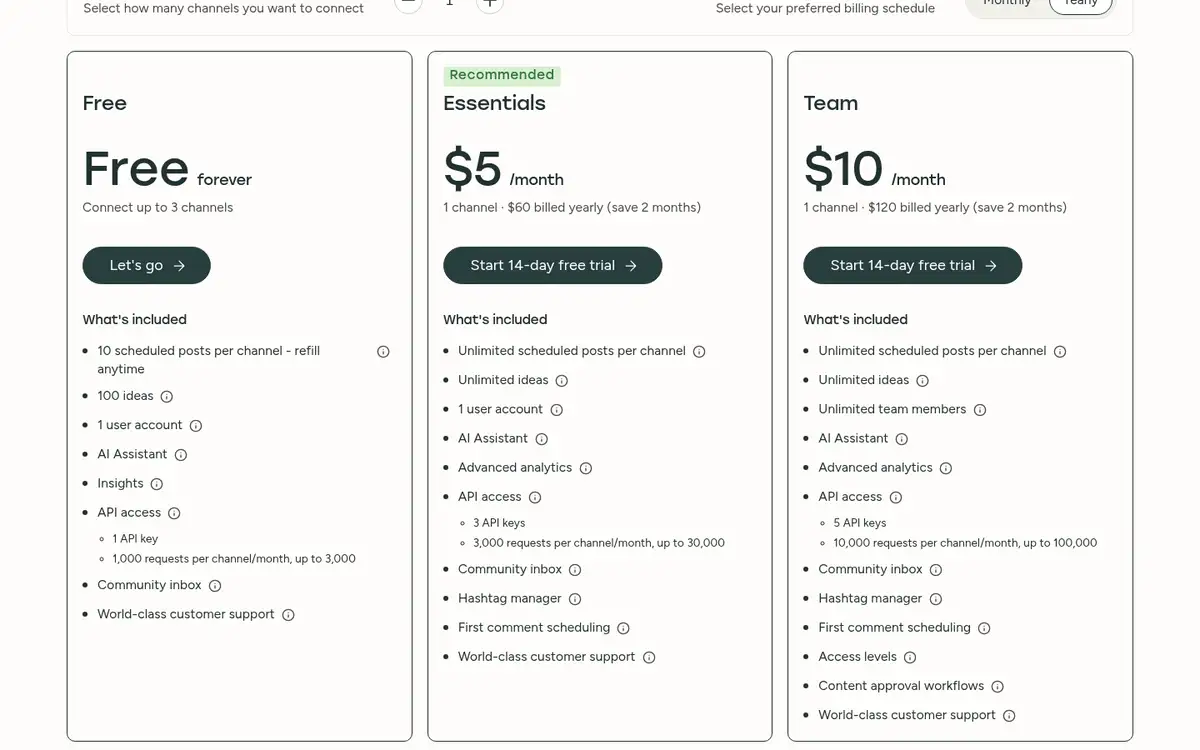
Buffer is the cleanest fit when the work already exists and the team keeps losing time adapting and scheduling it for each network. Its calendar, queue, reminders, community inbox, AI Assistant, and Insights keep a small social operation in one place. The paid Team plan adds unlimited team members, approvals, access levels, permissions, and branded reports.
For a narrower scheduling decision, compare these social media scheduling tool options for small teams. The free plan supports up to three connected channels, one user, and 10 scheduled posts per channel. Essentials is listed at $5 per month for one channel, and Team at $10 per month for one channel; paid plans have a 14-day free trial. The price is per connected channel, so model the total number of profiles rather than stopping at the headline price.
Buffer suits a team whose first broken handoff is draft to publish. It is less suited to a team that wants the same system to manage SEO research, CRM follow-up, or a deep lead-to-revenue loop. Free also has a 10-post queue and shorter Insights history, while advanced approvals and custom permissions sit on higher plans.
Constant Contact: Turn social attention into an owned audience
A social post can earn a reply and still leave the team with nowhere durable to put that interest. Constant Contact is the stronger choice when the next step is an email list, an event registration, a form, or an SMS follow-up. It combines email marketing, social posting, forms, events, automation, reporting, and integrations instead of treating social as the whole campaign.
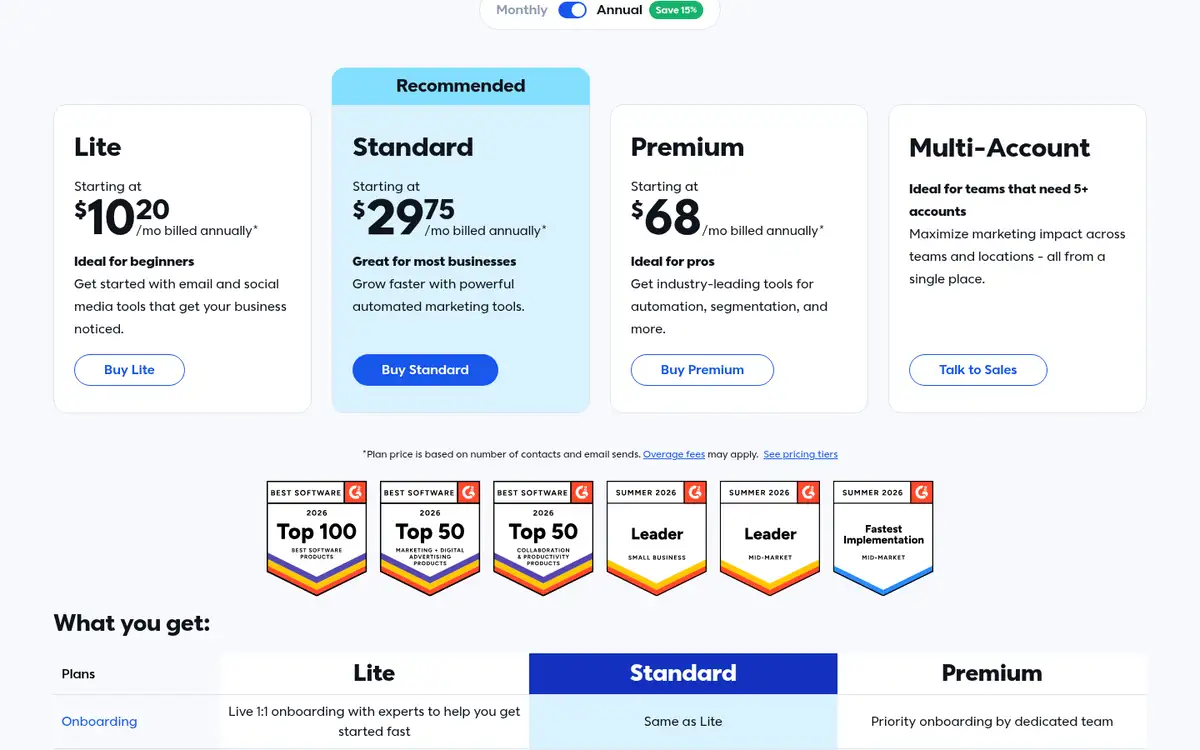
Lite starts at $12 per month on monthly billing for the smallest contact tier. Standard starts at $35 and Premium at $80; the page also shows lower equivalent prices for annual prepayment. There is a free trial without a credit card, and the offer shown is a 30-day trial rather than a free-forever tier. Pricing changes with contact count and monthly email sends, and overage fees can apply. SMS is a separate cost on Lite and Standard, while Premium includes an initial monthly allowance.
Choose Constant Contact when the team needs to carry a social response into a permission-based relationship. Its trade-off is focus: it is less suitable than a social specialist for deep listening, competitor benchmarking, or complex social approvals. A team that does not plan to build an owned audience may pay for breadth it will not use.
Metricool: Replace reporting assembly with one measurement view
The reporting handoff looks small until someone has to collect platform screenshots, normalize dates, explain changes, and turn the result into a client or owner update. Metricool brings scheduling, inbox work, competitor research, analytics, link-in-bio pages, and automated PDF or PowerPoint reports into the same product.
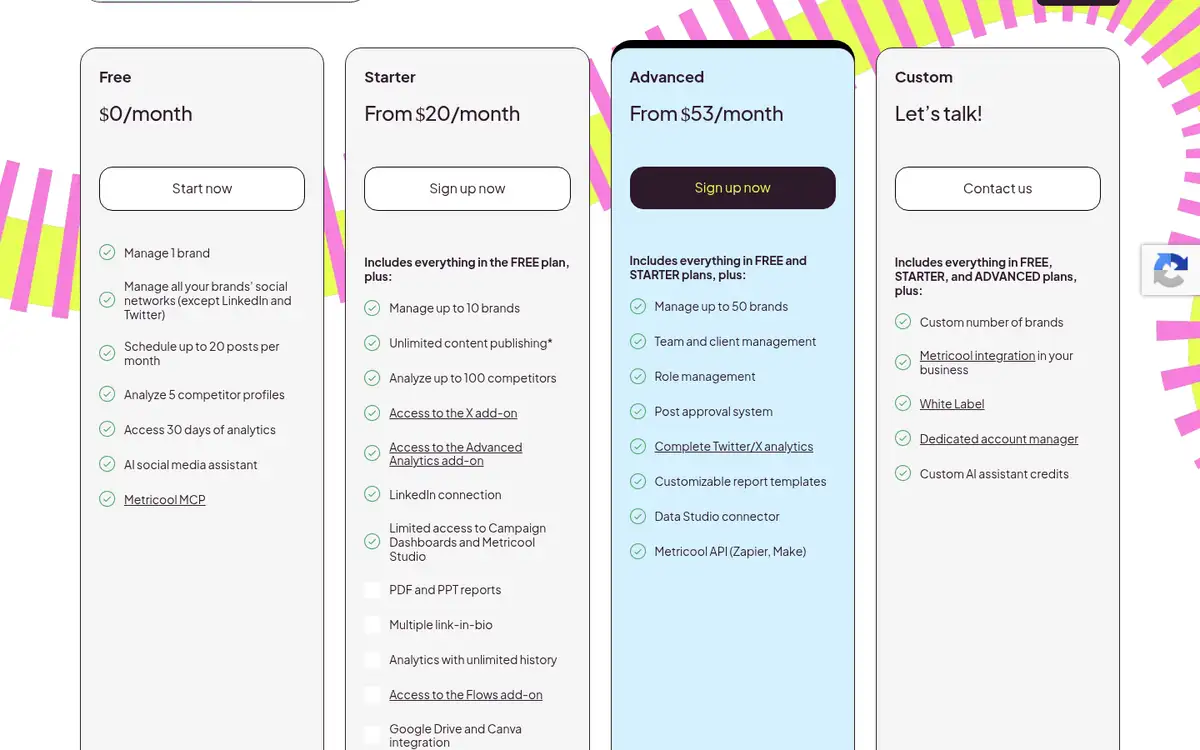
Its free plan covers one brand, 20 scheduled posts per month, five competitor profiles, and 30 days of analytics. The current pricing page showed two USD starting displays for Starter, $20 and $25, depending on the pricing block and configuration, so treat $20-$25 per month as the published entry range and verify the checkout view. LinkedIn is unavailable on Free, and X requires an add-on.
Metricool is a good match for a small team that already knows what it wants to publish and needs a reliable way to show what happened. Free and Starter do not include the stronger approval and role controls that arrive with Advanced. That makes it a reporting-first choice, not the best home for a team trying to fix a scattered creation process.
HubSpot: Connect marketing activity to CRM follow-up
HubSpot earns consideration when a lead should move from a campaign interaction into a contact record, segmentation, email, and a sales or service process. Its free CRM includes unified contact records, company and deal management, activity tracking, and app syncing. Paid tiers add email, automation, segmentation, and broader marketing tools; the current marketing pricing page places social media management, advanced automation, and Marketing Studio at Professional.
The current page displays Free at $0, Starter from €7 per seat per month, and Professional from €90 per seat per month in its euro pricing view. HubSpot’s entry point is a free CRM plan; the paid cards shown here do not list a trial. The practical question is whether the team needs the Professional tier for the social and marketing functions that motivated the purchase.
HubSpot fits an established CRM-led business with a real follow-up process. It is a poor first buy for a small team that only needs a calendar and a few reports. Per-seat pricing, plan complexity, and the higher tier for social management can recreate the cost problem even while removing a data handoff.
Zapier: Automate the gaps between specialist tools
Sometimes the team does not need a new marketing home. It needs a reliable bridge: a form creates a lead, the lead enters a CRM, an owner gets a message, and an approved content item moves into the next system. Zapier is built for those transfers, with triggers, actions, multi-step workflows, filters, paths, forms, tables, and connections to more than 9,000 apps.
The free plan includes 100 tasks per month, unlimited Zaps, and two-step workflows. Professional starts at $19.99 per month and adds multi-step Zaps, premium apps, webhooks, and other workflow controls; a new account receives a 14-day Professional trial without a credit card. Team starts at $69 per month for up to 25 users. Each successful action counts as a task, so the cost depends on how often workflows run and how many actions they complete.
Zapier connects systems; it does not supply a publishing or measurement home. It cannot replace a calendar, social inbox, approval system, or campaign analytics view. Use it after naming the missing handoff and calculating task volume; otherwise it can turn a simple process into a collection of small automations that still needs a person to supervise.
Choose by the first handoff that breaks
Use the first failure in the workflow as the tie-breaker:
- When the team repeats the brief, brand context, or performance lesson in several tools, start with BrightBean.
- When content is ready but publishing across channels takes too long, start with Buffer.
- When social interest disappears because nobody captures it for later contact, start with Constant Contact.
- When the monthly report is the most manual deliverable, start with Metricool.
- When leads exist but marketing and sales cannot act on the same record, start with HubSpot.
- When each specialist tool is fine on its own but the transfers are brittle, start with Zapier.
Then run one real campaign through the shortlist. Count every retyped brief, download, upload, spreadsheet merge, and approval request. Test the free plan or trial with the channels, contacts, seats, and reporting period you expect to use, not with an empty workspace.
A small team usually has more to gain from removing one repeated handoff than from adding six new features. Pick the tool that makes the next campaign easier to finish and easier to learn from.
Frequently asked questions
Are online marketing tools the same as social media management tools?
Social media management is one part of online marketing. It usually covers scheduling, publishing, comments, messages, and channel analytics, while broader marketing tools can add email, CRM records, automation, forms, SEO work, or revenue reporting.
Should a small business choose one all-in-one tool or several specialists?
Choose an all-in-one product when the same context keeps getting re-entered across planning, creation, publishing, and measurement. Choose specialists when one narrow job, such as social scheduling or reporting, is the only bottleneck and the surrounding workflow is already stable.
Can a free plan support a small marketing team?
It can support a test or a narrow job, but free plans usually limit a different resource: Buffer limits channels and queued posts, Metricool limits brands and scheduled posts, BrightBean keeps AI generation out of Free, and Zapier limits monthly tasks. Test the actual handoff you need to remove before treating a free plan as a long-term stack.
Sources
- The 11 Best Social Media Management Tools in 2026 — Tried + Tested: https://buffer.com/resources/best-social-media-management-tools/. A September 2026 comparison of social management tools, their audiences, capabilities, pricing, and trade-offs, used to identify the small-team publishing and specialist-tool landscape.
- 11 Best Social Media Marketing Tools for Small Businesses: https://www.constantcontact.com/blog/best-social-media-marketing-tools/. An October 2026 comparison that evaluates tools by creation, publishing, engagement, analytics, collaboration, pricing, and fit for small businesses.
- BrightBean pricing: https://brightbean.xyz/pricing/. Current BrightBean workspace and Chat pricing, plan limits, credits, publishing features, and access model.
- Buffer pricing: https://buffer.com/pricing. Current Buffer plan pricing, channel limits, trials, scheduling, analytics, inbox, collaboration, and approval features.
- Constant Contact pricing: https://www.constantcontact.com/pricing. Current Constant Contact plan pricing, contact and send limits, free trial, email, social, SMS, event, automation, and reporting features.
- Metricool pricing: https://metricool.com/pricing/. Current Metricool plan displays for publishing, brands, scheduled posts, analytics, competitor research, reports, integrations, and team controls.
- HubSpot marketing pricing: https://www.hubspot.com/pricing/marketing. Current HubSpot pricing view for Free, Starter, Professional, and Enterprise capabilities, including CRM, automation, social management, and marketing tools.
- Zapier pricing: https://zapier.com/pricing. Current Zapier plan pricing, task limits, workflow steps, trial, team limits, and app-connection capabilities.