
Social Media Scheduling Tool: 7 Options for Small Teams
Compare seven social media scheduling tool options for small teams by price, channels, approvals, publishing workflow, analytics, and trade-offs.

On this page
For a small marketing team, a social media scheduling tool should do more than queue posts. It should let one person plan a week, send content through review, publish to the right accounts, and see what happened afterward. Buffer is the simplest budget pick, Metricool is the stronger analytics pick, Planable has the clearest approval workflow, and BrightBean, our own product, fits teams that want scheduling inside a wider content-and-learning system.
Prices and plan limits checked November 10, 2026. Annual-billing prices are labeled as such; taxes may apply.
TL;DR
- Choose Buffer for a familiar, low-cost scheduler with a useful free plan. Team is the tier to inspect when approvals and multiple users matter.
- Choose Metricool when performance review is as important as publishing. Its free plan is unusually useful, but LinkedIn and X are outside that tier.
- Choose Planable for a review-heavy process, Publer for broad network coverage at a low price, Later for visual planning, and SocialBee for evergreen content categories and recycling.
- Choose BrightBean when the team wants brand context, content creation, planning, publishing, analytics, and learning connected. Its free plan is for manual publishing; the wider workflow starts in the trial and paid plans.
How to compare a social media scheduling tool for a small team
A long list of network logos does not tell you whether a tool fits the way your team works. Compare these five points before you compare feature counts.
- Channels and account types. Check the exact profile or page types you use. Instagram business, Instagram personal, Facebook Groups, LinkedIn Pages, TikTok business accounts, and YouTube Shorts can have different publishing and analytics rules inside the same product.
- The review path. Decide who drafts, who comments, who approves, and who can publish. A tool that gives you a calendar but no approval step may create another handoff instead of removing one.
- The useful limit. Some products limit scheduled posts per channel or profile. Others charge by connected channel, workspace, brand, or user. Work out the number of accounts and posts your next month needs, not just the headline price.
If free access is part of the decision, compare the free plans that stay usable after a trial rather than treating every signup as the same.
- Performance review. A small team usually needs a clear answer to three questions: what was published, what received attention, and what should change next. Check the history window, report depth, competitor data, and whether analytics are included or sold as an add-on.
- What happens before and after the calendar. A scheduler handles the middle of the process. If your team also needs research, content creation, brand context, or a feedback loop from performance into the next plan, a broader workflow may be worth comparing with a scheduler-only tool.
I narrowed this list to tools with a clear small-team entry point, documented scheduling coverage, and enough detail about collaboration or performance review to make a buying decision. Hootsuite is a useful upper-bound comparison, but its official plans page lists Standard at $99 per user per month and positions the product around broader management, listening, and reporting. That makes it less useful as the default recommendation for a compact team on a careful budget.
One disclosure: BrightBean is our own product. It is included because it genuinely handles social scheduling for this reader, while also covering a wider marketing workflow. It is judged below on the same price, channel, review, publishing, and performance criteria.
Seven social media scheduling tools worth comparing
| Tool | Best fit | Starting access | Team and review signal | Main trade-off |
|---|---|---|---|---|
| Buffer | Straightforward scheduling on a small budget | Free; paid from $5 per channel/month on annual billing; 14-day paid-plan trial | Team starts at $10 per channel/month and adds unlimited members and approval workflows | Per-channel pricing grows with account count |
| Metricool | Publishing plus performance review | Free; Starter from $20/month in the page’s displayed USD configuration | Advanced starts from $53/month and adds roles, team/client management, and approvals | Free plan excludes LinkedIn and X and caps scheduling at 20 posts/month |
| Planable | Content feedback and approvals | 50-post free trial; Basic is $33 per workspace/month | Unlimited users on paid plans; Pro adds stronger approval options and 10 social pages | Analytics and Social Inbox are add-ons |
| Publer | Broad coverage at a low price | Free; Professional from $4/month on annual billing; 7-day trial | Business from $8/month annually adds analytics, reports, and collaboration features | Daily posting limits and some network actions use reminders |
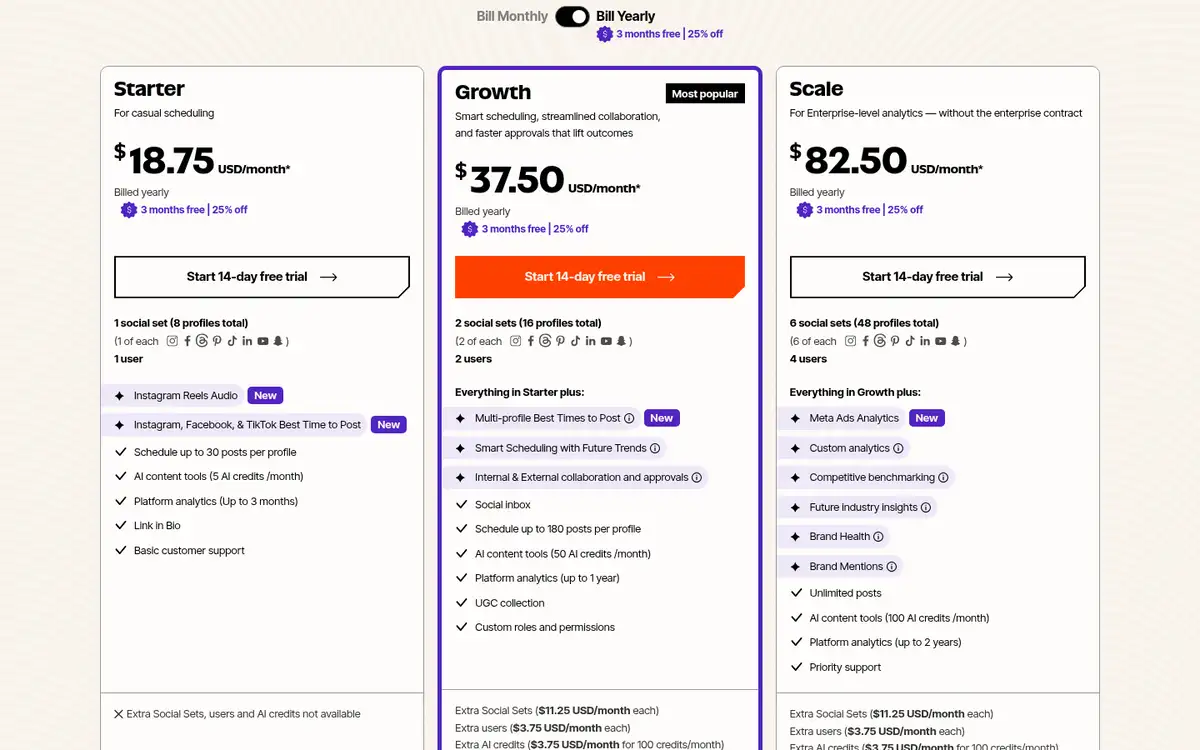
| Later | Visual-first Instagram, TikTok, and Pinterest work | Starter is $18.75/month on annual billing; 14-day trial | Growth is $37.50/month annually and adds approvals, two users, and inbox features | Lower tiers count scheduled posts per profile each month |
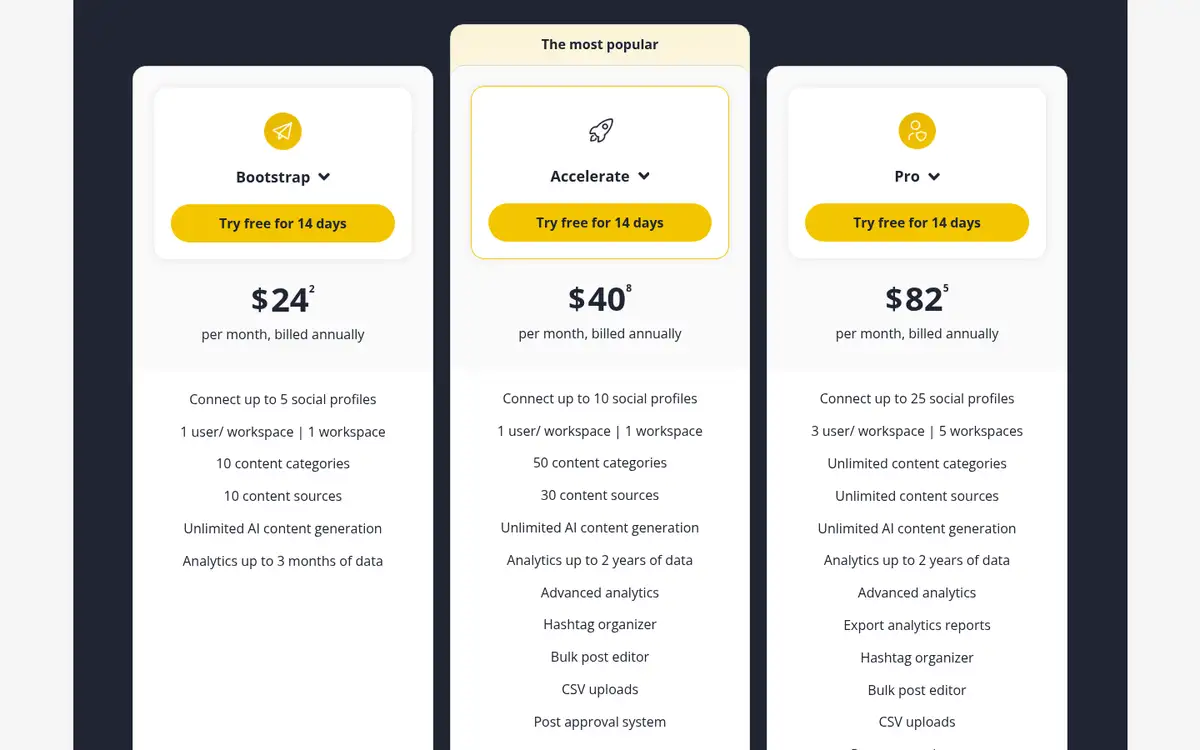
| SocialBee | Evergreen libraries and content categories | 14-day trial; Bootstrap is $24/month on annual billing | Accelerate is $40.80/month annually and adds approvals and advanced analytics | Entry plans allow one user and one workspace |
| BrightBean | A connected content-and-learning workflow | Free manual-publishing plan; $7 one-time seven-day full-product trial | Review, calendar, inbox, and publishing sit alongside the broader workflow | Full generated-content and marketing-brain features are not in Free; paid Plan is $119 per workspace/month |
1. Buffer: Best for a simple, low-cost scheduler
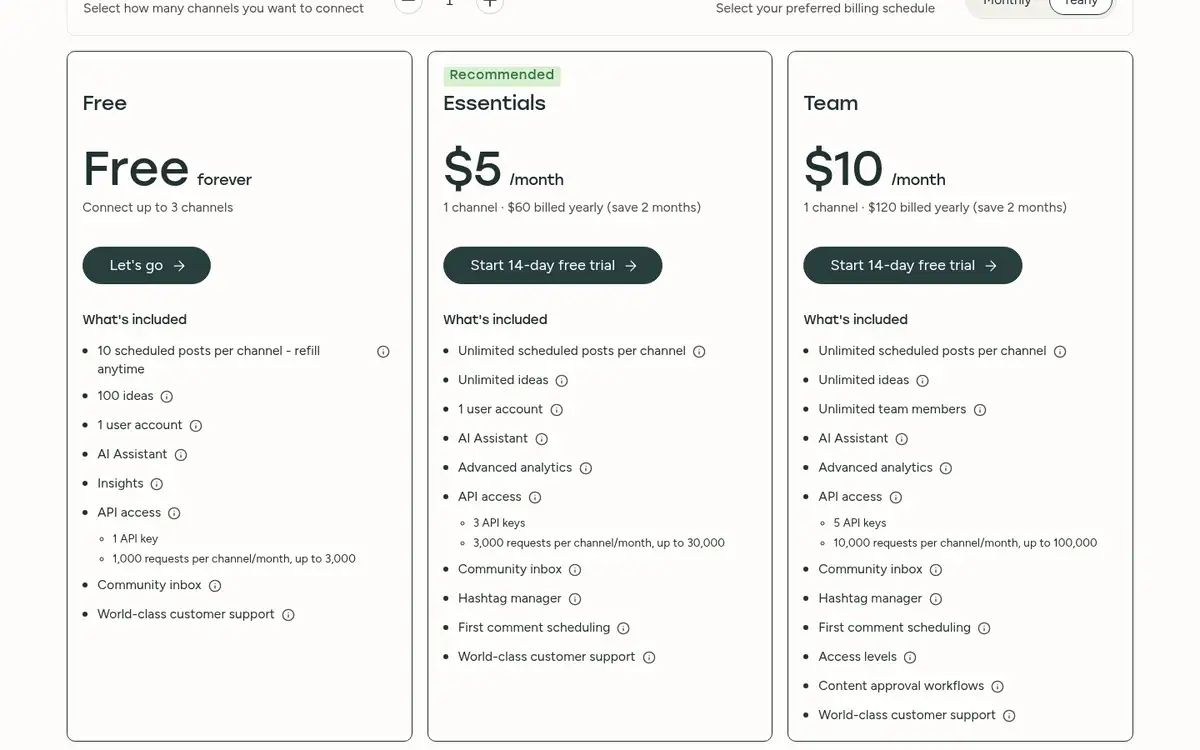
Buffer is the easiest default when the team wants a clean calendar, dependable queues, and a price that starts small. Its Free plan supports up to three channels and 10 scheduled posts per channel. One user is included, so it works best when one person owns the calendar.
The paid steps are easy to understand. Essentials starts at $5 per channel per month with annual billing and adds unlimited scheduled posts, advanced analytics, and unlimited ideas. Team starts at $10 per channel per month and adds unlimited team members, approval workflows, and access levels. Both paid tiers have a 14-day free trial.
Buffer covers major networks including Instagram, Facebook, LinkedIn, TikTok, Pinterest, YouTube Shorts, Threads, Bluesky, Mastodon, Google Business Profiles, and X. The details vary by account type: for example, Instagram personal profiles use reminder publishing, while some business and creator accounts support automatic publishing and analytics.
Choose Buffer when the team needs the calendar first and can keep the rest of the workflow lightweight. Price the connected channels before you commit. A tool that looks inexpensive at one channel can become a different budget line when every client, brand, or profile is billed separately.
2. Metricool: Best for publishing and performance review
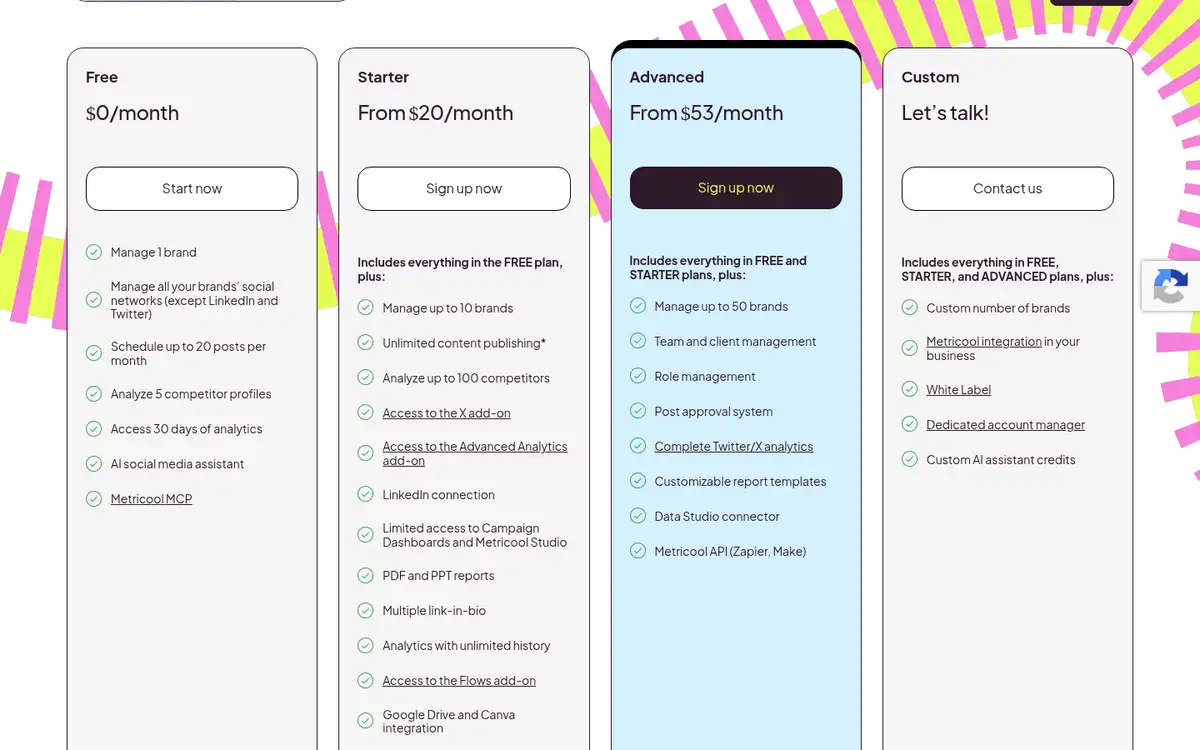
Metricool is a stronger fit when the team wants to look at performance in the same place it schedules content. Its free plan includes one brand, 20 scheduled posts per month, 30 days of analytics, five competitor profiles, an AI social media assistant, and Metricool MCP.
The free plan has an important boundary: LinkedIn and X are not included. The pricing page’s displayed USD configuration shows Starter from $20 per month and Advanced from $53 per month. Starter adds unlimited publishing, more brands, LinkedIn, longer analytics history, reports, and integrations. Advanced adds team and client management, roles, post approvals, and API access.
That makes Metricool a good choice for a small team that wants a publishing calendar tied to a reporting habit. It is also a useful way to test whether your team will actually review competitor and content data before paying for a larger suite.
The trade-off is plan detail. The page displays several currencies and brand bundles, and paid scheduling is subject to a Fair Use Policy. Use the USD figure only as a starting comparison and confirm the exact brand count, currency, and add-ons for your workspace.
3. Planable: Best for approvals and content feedback
Planable treats scheduling as part of the review process. That matters when a compact team has a subject-matter reviewer, a client, or a founder who needs to see the post before it goes live.
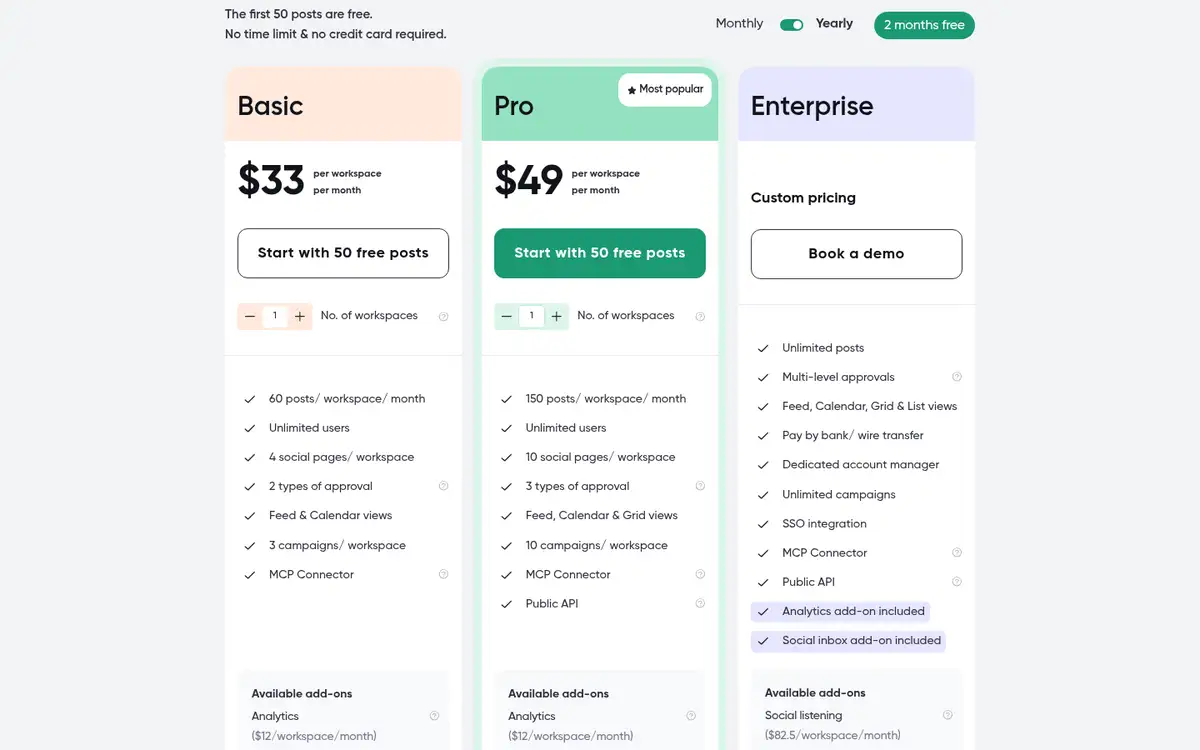
Basic costs $33 per workspace per month and includes 60 posts per workspace per month, four social pages, unlimited users, two approval types, three campaigns, and feed and calendar views. Pro costs $49 per workspace per month, raises the limit to 150 posts and 10 social pages, and adds broader approval options, grid view, and a public API. Paid plans are priced per workspace, not per user.
Planable also offers a free trial with 50 created posts, no time limit, and no credit card requirement. X publishing is unavailable during that trial. Analytics and Social Inbox are separate add-ons, so include them in the comparison if performance review or comment management is part of the job.
Pick Planable when feedback is the bottleneck. Its limitation is that workspaces are separate environments for brands or clients. A team managing several brands needs to model that workspace count before treating the base price as the full cost.
4. Publer: Best for broad network coverage on a small budget
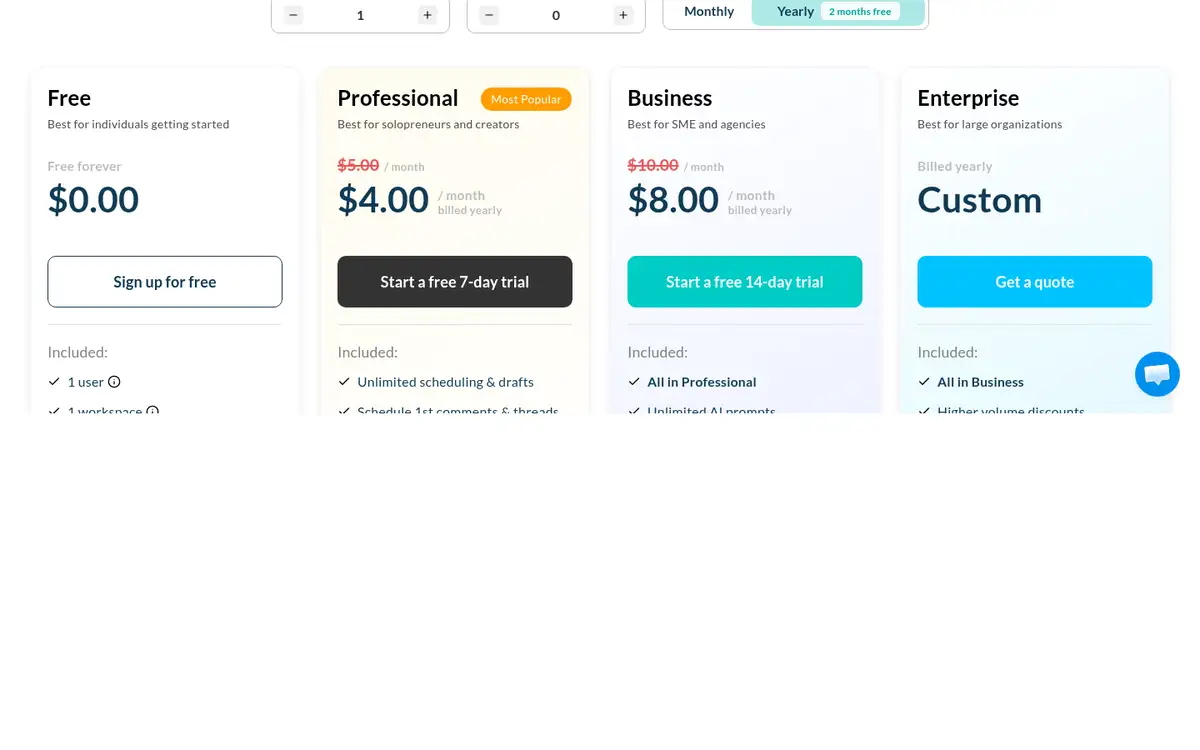
Publer gives a small team a low-cost route to a wide set of destinations. Its Free plan includes one user, one workspace, three social accounts excluding X, and 10 scheduled posts per account. It also lets a team try many paid features before upgrading.
Professional starts at $4 per month with annual billing, or $5 month to month, and includes a seven-day free trial. Business starts at $8 per month annually, or $10 month to month, and adds analytics and reports, best-time recommendations, competitor analysis, hashtag features, recycling, and API or MCP access. Approval workflows, roles, and access levels are part of the paid collaboration set.
Publer supports Facebook, Instagram, TikTok, X, Threads, LinkedIn, Pinterest, Mastodon, Google Business Profiles, YouTube, WordPress, Telegram, and Bluesky. That breadth is useful when a team publishes beyond the usual four networks. It also means you should check the exact action supported for each network. Some actions, such as Facebook Group posts, use reminders or push notifications rather than full automatic publishing.
Publer is the budget pick for a team that values coverage and can work within daily posting limits. The free plan’s X restriction and the network-specific exceptions are the details to test before moving a busy calendar.
5. Later: Best for visual-first social planning
Later is built around a visual calendar and is a natural fit for teams working heavily with Instagram, TikTok, Pinterest, and other image-led channels. Its plans also support Facebook, Threads, YouTube, LinkedIn, and Snapchat.
Starter is $18.75 per month with annual billing and includes one Social Set containing eight profiles, one user, up to 30 scheduled posts per profile each month, three months of analytics, Link in Bio, and a 14-day free trial. Growth is $37.50 per month annually and includes two Social Sets, two users, up to 180 posts per profile each month, internal and external collaboration, approvals, a social inbox, and a year of analytics.
The profile-based allowance is the number to watch. A team can have room for eight profiles and still run into the monthly post limit on a busy profile. Growth is the more relevant comparison when two people need to review content or when comments and messages belong in the same workflow.
Choose Later when the team needs to see how the grid, captions, media, and publishing schedule work together. Choose something else when deep cross-channel reporting or a large approval structure matters more than visual planning.
6. SocialBee: Best for evergreen content categories and recycling
SocialBee is useful when the team has a library of evergreen ideas and wants more control than a simple chronological queue. Content categories, RSS sources, recycling rules, expiration rules, and best-time suggestions are central to its workflow.
Bootstrap starts at $24 per month with annual billing and includes five social profiles, one user per workspace, one workspace, 10 content categories, 10 content sources, and three months of analytics. Accelerate is $40.80 per month annually and raises the profile limit to 10, adds advanced analytics, bulk editing, CSV uploads, and post approvals. Pro is $82.50 per month annually and supports three users per workspace and five workspaces.
SocialBee offers a 14-day trial without requiring a credit card. Its direct publishing list includes Facebook, Instagram, Threads, LinkedIn, X, Pinterest, TikTok, YouTube, Google Business Profiles, and Bluesky, with additional networks available through its mobile-app Universal Posting flow.
The entry plan is designed for one operator. If review is part of the team’s normal path, Accelerate is the more honest comparison. SocialBee earns its place when recycling and category-based planning solve a real problem; it is less compelling if the team only needs a shared approval calendar.
7. BrightBean: Best for a connected marketing workflow
BrightBean is our own product, and it is a different kind of option from the scheduler-first tools above. The main product is an AI-native marketing setup that coordinates ideation, research, content creation, brand-aware adaptation, SEO and GEO work, social and blog planning, publishing, analytics, and performance-informed improvement around shared brand context. People stay in control of approvals and direction.
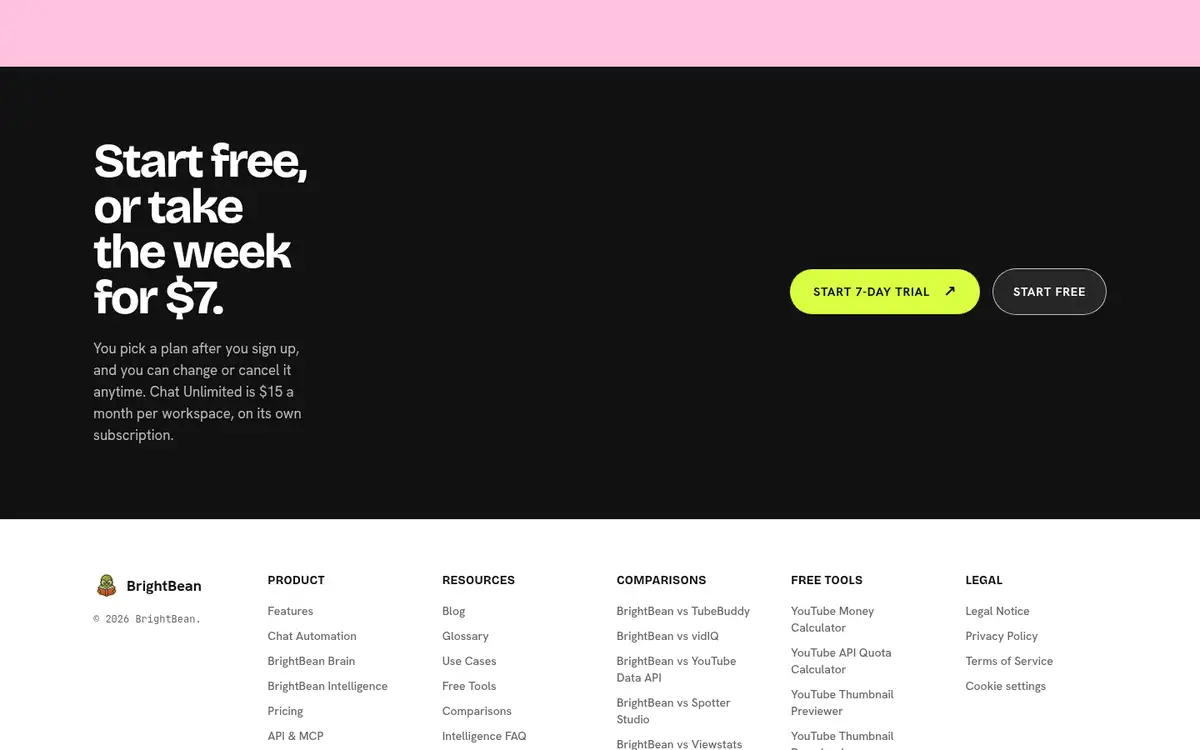
The access model needs a clear distinction. The Free plan is $0 forever and supports customer-created posts and captions, customer-added images, scheduling, publishing, the calendar, the social inbox, the platform API and MCP server, and optional post approval. It has no generation credits and no generated content. The full product is available in a seven-day trial for a one-time $7, and the Plan tier is $119 per workspace per month or $1,200 billed annually. Members and connected accounts are unlimited on every workspace plan.
That makes BrightBean a fit for a small team that is tired of carrying brand context between separate planning, writing, publishing, and reporting tools. It is also the least sensible choice if all the team needs is a queue. The free plan is manual, and the connected content-and-learning workflow belongs to the trial and paid access rather than the free tier.
The decision is straightforward: compare BrightBean with a scheduler when the problem is disconnected marketing work, not just unscheduled posts. Compare it with the low-cost tools above when the job is simply to fill a calendar and publish.
A practical decision rule for a compact team
Start with next month’s real workflow rather than a feature checklist. Write down the channels, number of profiles, weekly post volume, reviewers, and reports the team must handle. Then choose the lowest tier that supports the complete path from draft to approval to publishing to review.
- Buffer is the safest starting point for simple scheduling and a modest budget.
- Metricool is the better first test when analytics and competitor review will shape the next calendar.
- Planable is the stronger choice when comments and approvals are slowing publication.
- Publer is the value option when network breadth matters more than a polished reporting layer.
- Later is the natural fit for visual teams; SocialBee is the natural fit for evergreen libraries.
- BrightBean belongs in the comparison when the team wants the calendar connected to the rest of marketing work, not when it only needs a queue.
If two tools still look close, a scheduler comparison that shows where each competitor wins can help expose the trade-off.
The best social media scheduling tool is the one whose limits match the workflow your team will actually run. A cheaper plan that forces manual exports, missing approvals, or a second analytics tool can cost more time than its price suggests.
Sources
- 13 Best Social Media Scheduling Tools (2025 Pros And Cons): https://readylogic.co/13-best-social-media-scheduling-tools-2026-pros-and-cons/. A practical shortlist of social scheduling tools with selection criteria covering channels, collaboration, automation, analytics, and team fit.
- Buffer pricing: https://buffer.com/pricing. Current Buffer plan prices, channel limits, free-plan allowances, trials, publishing coverage, analytics, and approval workflows.
- Hootsuite plans and pricing: https://www.hootsuite.com/plans. Hootsuite plan prices, trials, account limits, publishing, listening, reporting, and collaboration capabilities.
- Metricool pricing: https://metricool.com/pricing/. Metricool free and paid plan limits, brand pricing, publishing, analytics, competitor review, team management, and approvals.
- Planable pricing: https://planable.io/pricing/. Planable workspace prices, post and page limits, free-trial terms, collaboration, approval options, and add-on boundaries.
- Publer pricing: https://publer.io/pricing. Publer free and paid plan prices, trials, network coverage, scheduling limits, analytics, collaboration, and publishing exceptions.
- Later pricing: https://later.com/pricing. Later plan prices, profile and post allowances, trials, visual planning, analytics, collaboration, approvals, and inbox features.
- SocialBee pricing: https://socialbee.com/pricing/. SocialBee plan prices, trials, profile and user limits, content categories, recycling, analytics, and approval workflows.
- BrightBean pricing: https://brightbean.xyz/pricing/. BrightBean workspace pricing, free manual-publishing access, seven-day trial, paid plan, credits, channels, and account limits.
- BrightBean features: https://brightbean.xyz/features/. BrightBean scheduling, review, publishing, social inbox, analytics, brand context, content workflow, and performance-informed improvement capabilities.