
Buffer social media scheduling: Features, limits, and alternatives
See how Buffer social media scheduling works, what its free and paid plans cover, and when BrightBean or Postiz may fit a small team better.

On this page
Buffer social media scheduling is a good fit when the job is to prepare posts, adapt them for each network, and publish them from a shared calendar. For a Solo Founder or Small Marketing Team that also needs content creation, blog publishing, brand context, and performance-informed improvement in the same workflow, Buffer is a focused publishing option rather than the whole marketing setup. BrightBean, our product, covers that wider workflow; Postiz is the closer alternative when agent access, recurring posts, broad channel support, or self-hosting matters.
Prices and plan limits checked November 2026.
TL;DR
- Choose Buffer when your main problem is keeping social posts planned, adapted, and published without adding a larger marketing system.
- Choose BrightBean when the same setup needs to carry brand context from research through creation, blog publishing, social publishing, analytics, and performance-informed improvement.
- Choose Postiz when you want an agent-friendly scheduler with recurring posts, RSS automation, broad channel support, API access, or a self-hosted option.
- Buffer has the easiest low-cost starting point: a free plan for up to three channels and 10 scheduled posts per channel. BrightBean’s full-product trial is $7 for seven days, while Postiz offers a seven-day $0 trial but no permanent hosted free plan.
What Buffer social media scheduling includes
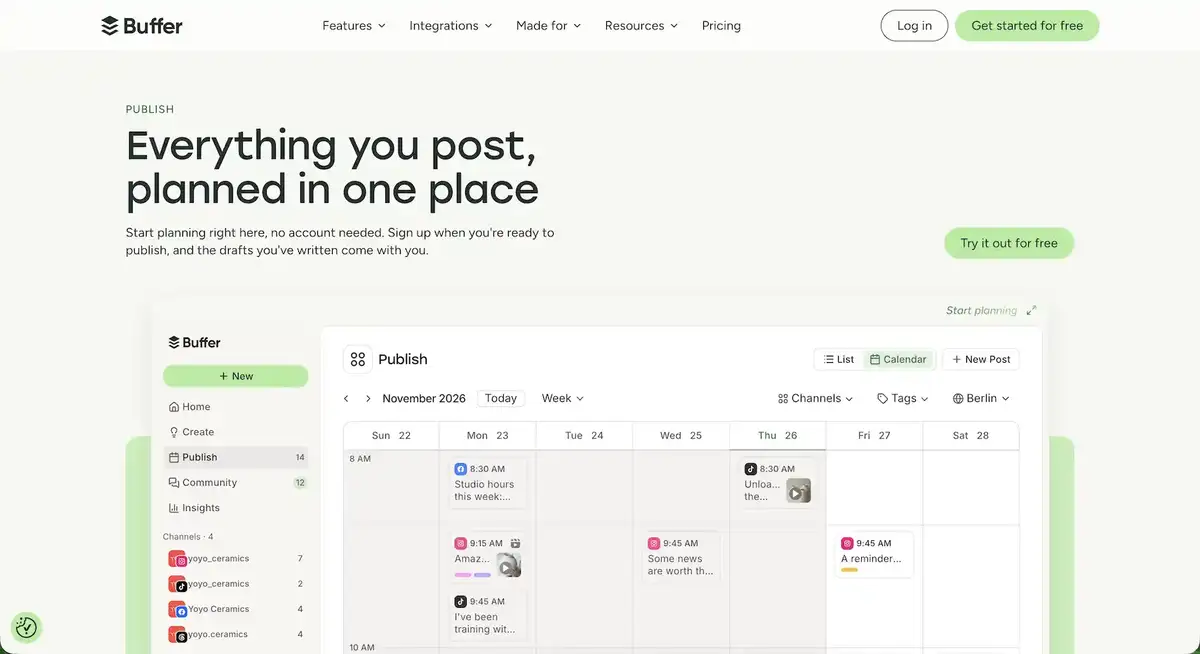
Think of the Buffer social media scheduling tool as a publishing layer. You connect social accounts, create a post, adjust the copy and media for each network, then choose the next available queue slot, a priority slot, immediate publishing, or a specific date and time. Each channel can have its own posting schedule and time zone.
Its calendar supports week and month views, filters, drag-and-drop rescheduling, and in-calendar editing. One post can become different platform-specific versions, so a LinkedIn caption does not have to match an Instagram caption. Buffer can publish automatically to some networks, while other network and account combinations use notification-based publishing where the platform does not allow direct publishing.
That covers the publishing routine most small teams mean when they say they need a scheduler:
- Capture an idea or draft.
- Adapt it for the selected networks.
- Put each version into a queue or time slot.
- Review what is scheduled.
- Use analytics and community replies to decide what to do next.
Buffer also includes an AI Assistant for generating, rewriting, shortening, and repurposing copy. Its Community inbox brings supported comments and messages into one place, while Insights and AI-generated Takeaways help connect published posts with later planning. Team adds unlimited members, access levels, and approval workflows.
Buffer’s pricing and limits
Buffer’s Free plan costs $0 forever and supports up to three connected channels, with 10 scheduled posts per channel. The limit is replenished as scheduled posts are published. Essentials starts at $5 per month per channel on annual billing and includes a 14-day trial. Team starts at $10 per month per channel on annual billing and adds unlimited team members, permissions, and approvals.
The important pricing detail is the unit: Buffer bills by connected channel, not by seat or workspace. That is simple for one person with a few profiles. It needs a closer look when a small team manages several brands, pages, or client accounts. Paid queues can hold up to 5,000 posts per channel under Buffer’s fair-use cap.
If free-plan limits are your main concern, our comparison of Buffer free alternatives by usable free plan goes deeper on channel caps and upgrade paths.
The comparison at a glance
| Tool | Best fit | Scheduling and publishing | Beyond scheduling | Starting access | Main trade-off |
|---|---|---|---|---|---|
| Buffer | Creators, consultants, and small teams that mainly need social publishing | Channel-specific versions, queues, calendar views, automatic or reminder publishing, drafts, and paid approvals | AI copy assistance, Community inbox, Insights, Takeaways, and a mobile workflow | Free for 3 channels and 10 scheduled posts per channel; paid plans from $5 per channel/month annually; 14-day paid trial | Pricing grows with connected channels, and approvals require Team |
| BrightBean | Solo Founders and Small Marketing Teams that need social publishing inside a wider marketing workflow | Account-level schedules, calendar views, drag-and-drop rescheduling, network previews, review controls, and publishing across 11 listed social networks | Shared brand context, AI-assisted creation, blog and SEO workflows, analytics, reviewable learnings, inbox, API, and MCP server | Free manual-publishing plan; $7 one-time seven-day full-product trial; Plan from $119 per workspace/month | The full workflow costs more than a focused scheduler, and Free does not include AI-generated content |
| Postiz | Teams that want agent access, recurring or RSS-driven publishing, broad channel coverage, or self-hosting | Per-channel versions, cross-posting, repeated posts, RSS auto-posting, unlimited posts on paid plans, and channel groups | AI Copilot, Smart Agent, analytics, API, webhooks, MCP server, CLI, and AI media allowances by plan | Seven-day $0 trial; Standard from $29/month for 5 channels; no permanent hosted free plan | Hosted use costs more than Buffer’s entry plan, while self-hosting adds infrastructure and maintenance work |
When Buffer is enough
Buffer is the sensible choice when the bottleneck is the queue itself. You already know what you want to say, your social accounts are the main destination, and the useful improvement is getting the work out of separate native apps and into one calendar.
It is also a good fit when you want to start small. The Free plan can cover a founder’s first few channels, and the paid plans add more queue capacity, deeper analytics, first-comment scheduling, saved replies, and team controls. You can keep the rest of your stack for research, writing, blog publishing, and measurement instead of replacing it all at once.
The boundary is the workflow around the queue. Buffer’s published product pages describe social creation, publishing, community, analytics, AI assistance, and collaboration. They do not position the product as a shared system for carrying brand context through SEO research, blog production, and performance-informed content improvement. If those handoffs are the problem, the cheapest scheduler may not be the cheapest setup to operate.
When BrightBean is the better fit
BrightBean is our product, so it is the owned option in this comparison. It belongs here because it does the scheduling job while also addressing the wider problem in the brief: scattered brand context, repeated explanations, separate content tools, and little connection between what was published and what should happen next.
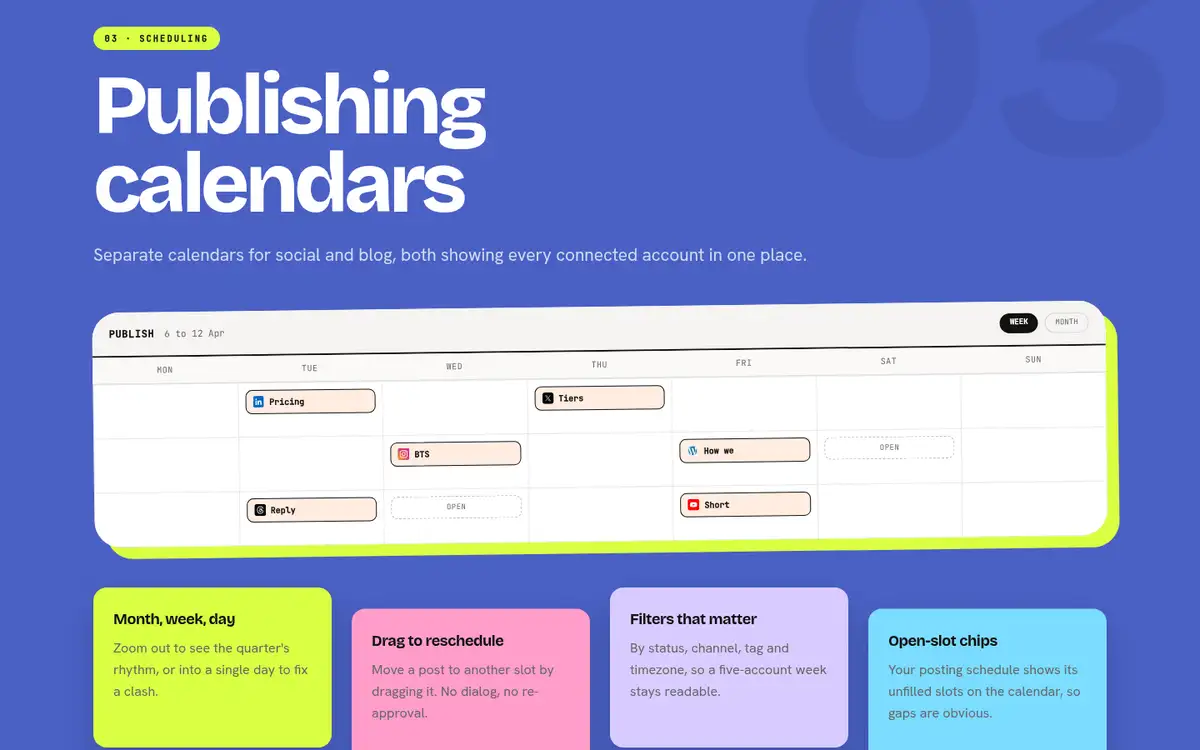
Its scheduling layer includes month, week, and day calendars, account-specific posting schedules, drag-and-drop rescheduling, network previews, approval controls, and four delivery modes: next available slot, prioritised queue placement, immediate publishing, or a set date and time. Social and blog work can be planned in separate calendars. The platform also includes a social inbox, analytics, Google Analytics 4 and Search Console connections, and a reviewable learning loop that can influence future drafts.
The difference is the context behind the draft. BrightBean’s marketing brain stores brand identity, voice, audience, positioning, previous work, research, and marketing learnings for future tasks. Its broader workflow covers ideation, research, social content, SEO/GEO content, blog publishing, AI-assisted image and video work, scheduling, performance analysis, and improvement. People remain in control of approvals and direction.
The trade-off is price and scope. BrightBean’s Free plan supports customer-created posts and images, scheduling, publishing, the calendar, social inbox, API, and MCP access, but it has no AI generation or full-product automation. The seven-day full-product trial costs $7 once, and the regular Plan is $119 per workspace per month. If all you need is a reliable social queue, that is more system than you need. If the queue is only one part of a fragmented marketing workflow, the wider scope is the reason to consider it.
When Postiz is the better fit
Postiz tests a different question: how much of the scheduling workflow should be available to agents and automation? Its hosted product lets a user create one post, adapt it per channel, schedule recurring versions, publish from RSS feeds, and connect through a public API, webhooks, MCP server, and CLI. Its pricing page lists unlimited posts on paid plans, analytics, customer groups, and an AI Copilot and Smart Agent.
That makes Postiz a stronger candidate than Buffer when channel breadth or an agent-driven workflow matters. It also offers an AGPL-3.0 open-source edition that can be self-hosted. Self-hosting avoids the hosted subscription, but the team takes on infrastructure, updates, backups, and social-network app approvals.
Standard starts at $29 per month for five channels, and every hosted plan begins with a seven-day $0 trial. There is no permanent hosted free plan. Team starts at $39 per month for 10 channels and adds unlimited team members, which may matter more to a growing team than Buffer’s per-channel price.
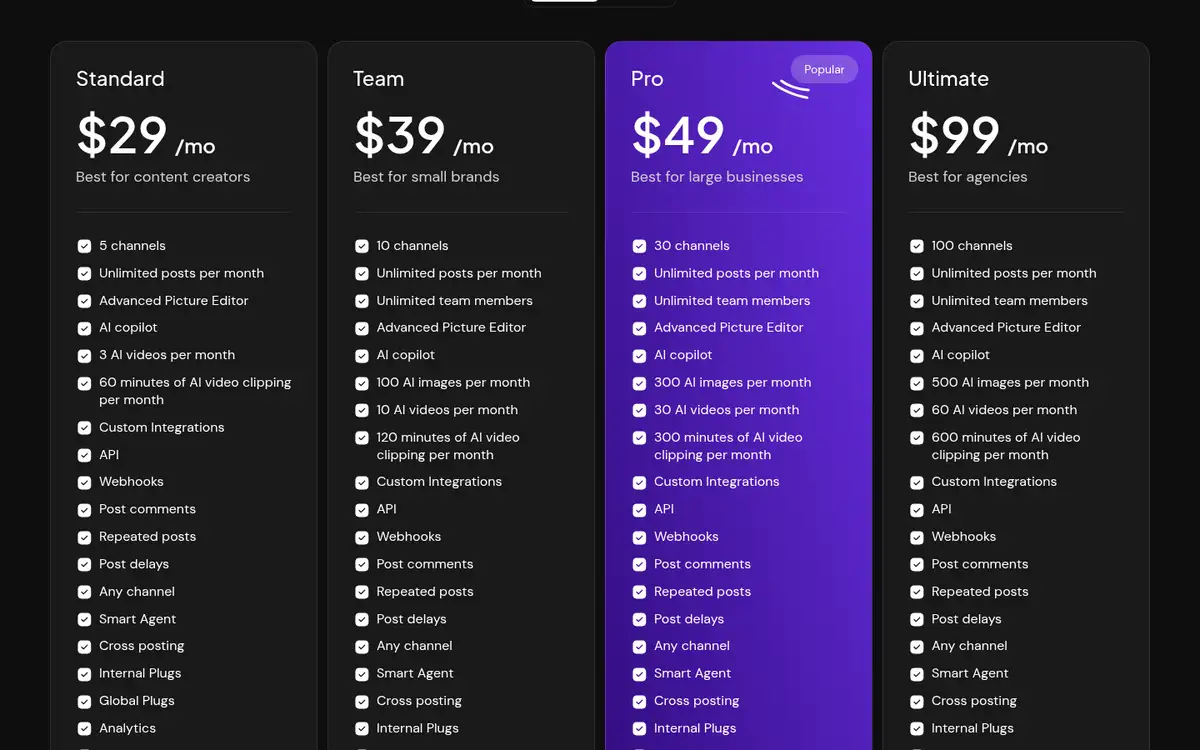
Postiz is still a different kind of alternative from BrightBean. Its published plan is organized around social channels, agents, recurring automation, and media generation. If your requirement is a durable brand context that also informs blog and SEO work, BrightBean is the closer match. If your requirement is to let an agent operate a broad social publishing layer, Postiz is the more direct fit.
How to choose for your workflow
Use the job, not the feature count, as the tiebreaker.
- Choose Buffer if you need a clean social calendar, channel-specific publishing, and a low-risk starting plan. It is the default when scheduling is the problem.
- Choose BrightBean if content starts from scattered context or a blank prompt, and you want one setup to connect research, creation, social and blog publishing, analytics, and learning. Its Free plan is useful for manual publishing; the paid workflow is the part to test.
- Choose Postiz if agents, RSS, repeated posts, API access, or self-hosting are central requirements. Budget for either the hosted subscription or the work of running the open-source edition.
Before switching, write down the channels you actually publish to, the number of brands or workspaces, whether someone must approve posts, and where content ideas and performance notes live today. Then test one week’s real workflow rather than comparing feature names. The right choice is the one that removes the handoff causing the work to stall.
A wider social media scheduler comparison that admits where competitors win is useful if your shortlist extends beyond these three.
Verdict: Choose the smallest system that removes the handoff
Buffer is a strong answer to a narrow question: how do we plan and publish social posts without opening every network separately? Its free plan and focused calendar make it a sensible first tool for a founder or small team.
The answer changes when scheduling is only the visible part of the problem. If brand context, content creation, blog publishing, analytics, and learning need to travel together, consider BrightBean. If agent access, recurring automation, broad channels, or self-hosting matters more, consider Postiz. Start with the workflow that is breaking, then pay for the smallest system that fixes that break.
Sources
- The Best Social Media Scheduling Tools in 2026 (+ How to Find the Perfect Fit): https://buffer.com/resources/social-media-scheduling-tools/. Defines common scheduler capabilities and compares scheduling, collaboration, inbox, analytics, and pricing criteria across social media tools.
- Buffer pricing: https://buffer.com/pricing. Lists Buffer's Free, Essentials, and Team plans, channel-based billing, paid trial, queue limits, and plan capabilities.
- Buffer Publish: https://buffer.com/publish. Describes Buffer's calendar, queues, platform-specific post versions, publishing modes, analytics, Community inbox, and approval workflow.
- BrightBean pricing: https://brightbean.xyz/pricing/. Lists BrightBean's free manual-publishing plan, seven-day full-product trial, workspace pricing, credits, scheduling, inbox, API, and MCP access.
- BrightBean features: https://brightbean.xyz/features/. Describes BrightBean's calendars, delivery modes, social networks, brand context, content workflow, analytics, reviewable learnings, and publishing controls.
- Postiz: https://postiz.com/. Describes Postiz's hosted and open-source scheduler, agent workflows, channel coverage, recurring and RSS publishing, analytics, and self-hosting model.
- Postiz pricing: https://postiz.com/pricing. Lists Postiz's hosted plans, channel limits, seven-day trial, unlimited paid-plan posts, AI allowances, API, webhooks, MCP, and team features.