
Reusable AI Video Prompt Template for Wall Ripping & Wall Peeling Text Reveals
Discover a reusable AI video prompt template for peel-away text reveals, with the master prompt, editable variables, timing guidance, and presets.
On this page
Discover a reusable AI video prompt template for peel-away & rip-away text reveals, with the master prompt, editable variables, timing guidance, and presets.
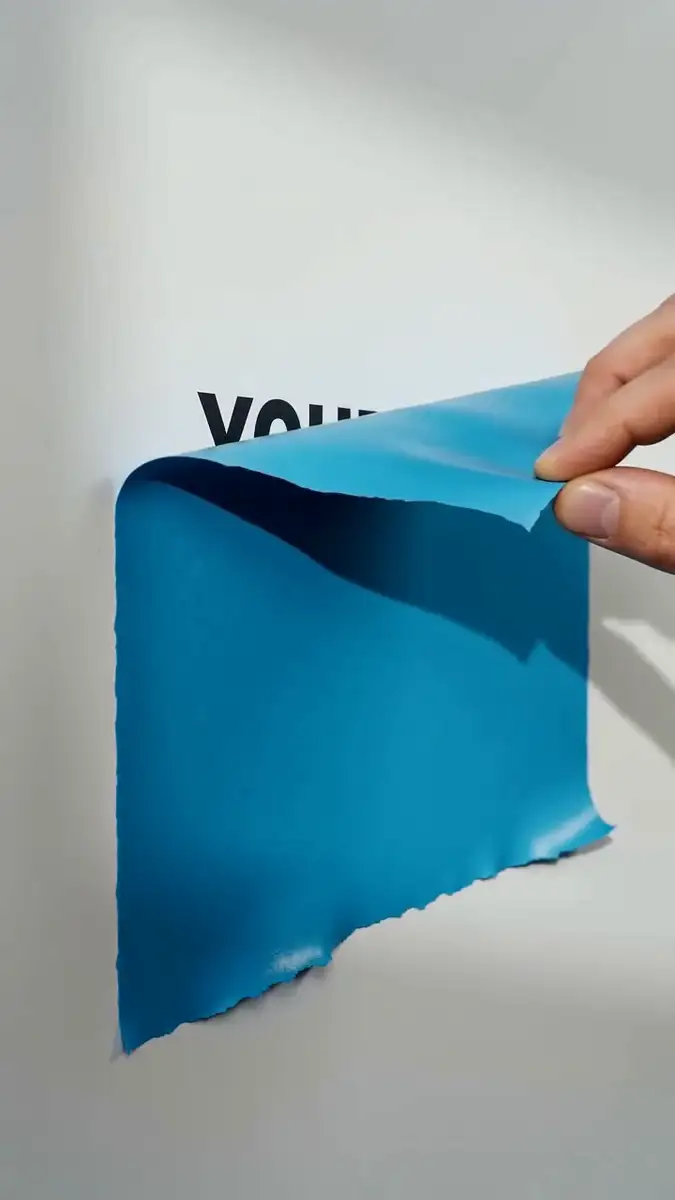
A short-form video can make a message feel physical: A coloured sheet covers the wall, a hand peels it away, and the words underneath become the payoff. The concept is simple. The challenge is giving a video model enough structure to preserve the wall, hand, material, text, and motion from the first frame to the last.
This article turns the supplied peel-away concept into a reusable AI video prompt template. You will get the full master prompt, a variable map, three presets, and an illustrative timing plan for adapting the format across campaigns.
TL;DR
- Use the master prompt to define the wall, sheet, hand, peel motion, revealed text, lighting, and physical constraints.
- Keep the recognizable action fixed, then change only campaign inputs such as colour, material, message, and hand style.
- Add duration, aspect ratio, and frame-rate instructions only when your video generator accepts them.
- Treat the $10K/MO agency line as a placeholder example that needs a source before publication.
The broader idea behind repeatable context also appears in this BrightBean Instagram post, which describes remembering brand, content, results, and decisions instead of starting every prompt from scratch.
1. Start with the complete peel-away text reveal prompt
A useful video prompt gives the generator a scene, a subject, a sequence, and boundaries. The peel-away format has a simple visual promise: The viewer sees a covered wall, watches the sheet come down, and reads the message that was hidden underneath. The prompt needs to preserve that order.
Master prompt
A close-up three-quarter perspective shot of a vertical, clean [WALL_TYPE, e.g. matte white studio drywall].
Affixed to the wall is a rectangular [PEELED_COLOR_AND_MATERIAL, e.g. vibrant matte cerulean blue vinyl adhesive sheet].

A [HAND_TYPE, e.g. real human right hand with visible forearm extending continuously from the top right edge of the frame]
grips the top edge of the sheet between thumb and fingers and smoothly peels it downward in a steady, continuous, tactile peeling motion.

As the sheet rolls down and peels away, it reveals bold, crisp black typographic text printed flat onto the wall underneath that reads:
"[REVEALED_TEXT_LINE_1] / [REVEALED_TEXT_LINE_2] / [REVEALED_TEXT_LINE_3]".

[LIGHTING, e.g. soft directional studio lighting from the top-left casting natural, subtle drop shadows behind the peeling flap and fingers].
Preserve a single continuous action, stable wall geometry, readable typography, realistic material deformation, and accurate hand anatomy.
Photorealistic 4K, macro studio texture, authentic human skin detail, and realistic paper or vinyl peeling physics.
The master prompt keeps the central action intact while making the campaign inputs replaceable. The hand and lighting placeholders are surfaced from the customization details in the brief, so the reusable template and the prompt body stay aligned. If you want the original defaults, use a real human right hand and soft directional studio lighting from the top-left.
Refillable customization template
| Variable | Default | Example customizations |
|---|---|---|
[WALL_TYPE] |
Clean matte white studio drywall | Smooth warm-cream concrete; minimalist off-white studio backdrop; light grey textured plaster wall |
[PEELED_COLOR_AND_MATERIAL] |
Vibrant matte cerulean blue vinyl sheet | Matte terracotta kraft paper; rich emerald green vinyl sticker; glossy hazard-orange poster; deep obsidian matte paper |
[REVEALED_TEXT_LINE_1/2/3] |
Three short lines that form one message | STOP / WASTING MONEY / ON ADS; NEW COLLECTION / DROPPING / FRIDAY; LESS HEADACHE / MORE / REVENUE |
[HAND_TYPE] |
Real human right hand with visible forearm | Manicured hand with natural nails; hand in a casual neutral sleeve; neutral studio model hand |
[LIGHTING] |
Soft directional studio lighting from the top-left | Warm golden-hour sunlight with sharper shadows; bright commercial diffuse studio light |
The brief also names [REVEALED_TEXT] as a single customization field. Use one complete text field when your generator handles a sentence more reliably than separate lines. Use line-specific fields when the visual layout and reveal order matter more.
Key Takeaway: The reusable part is the action and its visual rules. The wall, material, hand, lighting, and message can change without losing the peel-away idea.
2. What the prompt is actually controlling
The prompt looks like one paragraph, but each clause solves a different generation problem. Read it as a small production specification. That makes it easier to edit one decision without accidentally weakening another.
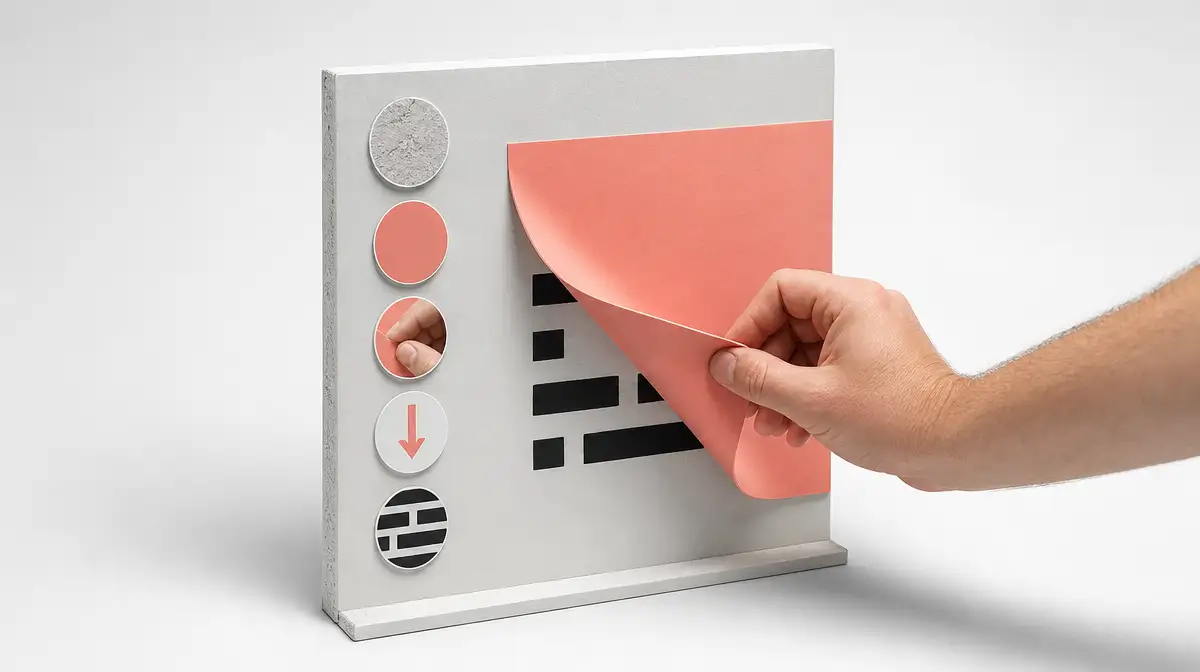
The wall is the stage
“Vertical” establishes the orientation. “Clean” and the wall material establish the surface the viewer should trust. Those details matter because the wall remains visible before, during, and after the peel. If the surface changes halfway through the clip, the reveal loses its physical logic.
The same applies to the sheet. Calling it a vinyl adhesive sheet, kraft paper, poster, or sticker gives the model a material to deform. Colour is part of the campaign identity, while material helps determine how the flap bends, curls, and catches at the edge.
The peel is the story beat
The hand enters from the top right, grips the top edge, and pulls downward. That sequence gives the generator a beginning, middle, and end without relying on a vague instruction such as “make it satisfying.” The visible forearm also gives the hand a continuous source instead of allowing a floating hand to appear at the edge.
The words “steady,” “continuous,” and “tactile” reinforce the intended rhythm. They do not replace a time plan, but they tell the generator that the action should read as one peel rather than a series of unrelated poses. “Rolls down and peels away” describes what the sheet does while the hand moves it.
Text is the payoff
The text is printed flat onto the wall, which makes it part of the revealed environment. “Bold” and “crisp” set a visual priority. The three line variables make the message easier to change while preserving the reveal’s layout.
Keep each line short enough to remain legible in a vertical frame. Use exact spelling, capitalization, and punctuation in the prompt. If the generator produces unstable lettering, review the clip for message accuracy before treating it as finished. A short, clear phrase gives the visual reveal room to do its work.
| Prompt block | Job | Failure it helps prevent |
|---|---|---|
| Wall and sheet | Anchor the surface and material | A changing background or a sheet that looks weightless |
| Hand and forearm | Define who performs the action and where it starts | Extra hands, disconnected anatomy, or a floating grip |
| Peel verbs | Describe the order and continuity of motion | Jumping poses, cuts, or a reveal with no visible cause |
| Text instruction | Define the message and its physical placement | Text that appears in the wrong place or loses the payoff |
| Lighting and physics | Support depth, shadows, and material behaviour | Flat objects, detached shadows, or an artificial-looking peel |
Key Takeaway: Every important phrase should answer a visible question: What is the surface? What moves? In what order? What must stay readable when the motion ends?
3. How to write an AI video prompt that stays coherent
The earlier sliding-puzzle breakdown on this blog describes a prompt as “a production brief written for a generative system.” That framing is useful here. A mood alone leaves too much open. Specify an asset with a subject, a sequence, a payoff, and constraints.
Define the final frame and output
The peel is the visual engine, but a generation brief still needs output settings when the tool supports them. Add duration, aspect ratio, resolution, frame rate, camera movement, and audio only when they matter to the version. If the generator does not expose one of those controls, leave it out rather than pretending the model will obey a setting it cannot receive.
| Control | What to specify | Why it matters |
|---|---|---|
| Duration | The intended length of the clip | Gives the peel enough time to read as one action |
| Aspect ratio | The destination frame shape | Protects the wall, hand, and revealed text from being cropped unexpectedly |
| Resolution | The delivery target | Sets an output goal without treating it as a guarantee of detail |
| Frame rate | The intended playback rate, when supported | Gives timing instructions a consistent vocabulary |
| Audio | Whether sound is part of the concept | Prevents the prompt from leaving an important delivery choice ambiguous |
The supplied master prompt focuses on the visual action and leaves these settings open. That is useful when the same concept may be adapted across tools. Add them in a separate production layer when you know where the clip will be used.
Describe motion as visible beats
An observable action gives the generator more to work with than an abstract request for a “satisfying” result. Break the action into the beats a viewer needs to understand:
- Establish the clean wall and the attached sheet.
- Show the hand and forearm gripping the top edge.
- Pull the sheet downward in one continuous motion.
- Reveal the text as the sheet rolls away.
- Leave the complete message visible long enough to read.
This sequence is short, but it gives the model a causal chain. The hand causes the sheet to move. The sheet exposes the wall. The wall carries the message. Each step supports the next one.
Put constraints where failures happen
A constraint earns its place when it protects something visible. “Single continuous action” protects motion continuity. “Printed flat onto the wall” protects the physical relationship between the message and the surface. “Accurate hand anatomy” protects a detail the model may get wrong in the frame.
Useful constraints for this format include:
- No camera cuts during the peel.
- One hand and one continuous visible forearm.
- No extra labels, buttons, logos, or background copy unless they are part of the brief.
- The sheet stays attached to the wall until the hand peels it away.
- The revealed text remains flat, bold, and readable.
- Shadows stay attached to the fingers, wall, and peeling flap.
If a generator supports a negative-prompt field, these constraints can be moved there. If it does not, keep them in the main description and place them close to the visual rule they protect.
Key Takeaway: A coherent AI video prompt tells the model what the viewer should see first, what causes the next movement, and what must still be true at the final frame.
4. Turn the idea into a reusable video prompt template
A template works when it protects the recognizable part of the format and exposes the parts a campaign needs to change. If every detail is a variable, the generator gets a different concept each time. If nothing can change, the format becomes a one-off.
Separate constants from variables
| Layer | Keep stable across versions | Change when the campaign requires it |
|---|---|---|
| Composition | Close-up three-quarter view of a vertical wall | A wider or side-angle view, tested as a deliberate format change |
| Core action | One hand grips the sheet and peels it downward | Peel direction or speed, tested separately |
| Reveal | Black typography is printed flat on the wall and appears under the sheet | Message, line breaks, and text length |
| Physical logic | The sheet stays attached until it is peeled; the hand remains connected to the forearm | Paper, vinyl, sticker, or poster material |
| Surface treatment | A clean, controlled wall with coherent shadows | Wall colour, texture, and lighting style |
The first three rows define the recognizability of the concept. The last two rows provide room for art direction. Keeping those layers separate makes a failed generation easier to diagnose.
Choose low-risk swaps first
Start with the variables that leave the action intact: Change the wall, sheet colour, sheet material, revealed words, hand presentation, or lighting. These changes can make the clip feel new while preserving the reason the format works.
Treat a new camera angle, a transparent sheet, a second hand, a moving camera, or multiple reveal surfaces as a new test layer. Each one changes what the viewer must track. Test those changes separately so you can tell whether a weak result came from the message, the material, or the choreography.
Add an optional production layer
When the chosen generator accepts structured output instructions, append a small production layer after the creative prompt:
Duration: [DURATION]
Aspect ratio: [ASPECT_RATIO]
Resolution: [RESOLUTION]
Frame rate: [FRAME_RATE]
Camera movement: [STATIC_OR_SPECIFIED_MOVEMENT]
Audio: [SOUND_DIRECTION_OR_NONE]
Continuity: One uninterrupted peel with no cuts or extra hands.
End state: Hold the fully revealed message clearly in frame.
The fields are deliberately open. A reusable template should not pretend that every video model accepts the same controls. Fill only the fields that the selected tool can interpret and that the intended version actually needs.
Key Takeaway: Keep the format’s identity in a small set of constants. Let campaign inputs change around that core instead of rewriting the whole prompt for every new message.
5. Use the presets, then plan the version you will test
The presets below show how the same physical structure can carry different messages. They are starting points for creative work, not proof that a particular hook will perform. Keep any factual or numerical campaign claim aligned with evidence before publishing it.
Preset 1: SaaS / Growth Hook (The Original)
A close-up three-quarter angle of a clean matte off-white studio wall. An opaque, vibrant matte royal blue vinyl sheet is stuck to the wall. A real human hand enters from the top right and firmly peels the blue sheet downwards in a single continuous, tactile motion. As the sheet peels down, bold black sans-serif text printed flat on the wall is revealed reading: "YOUR MARKETING IS MISSING A BRAIN". Soft directional studio lighting, realistic peeling physics, 4K photorealistic.Preset 2: Product / Brand Launch
A close-up three-quarter angle of a warm cream minimalist wall. An opaque pastel terracotta-orange adhesive paper sheet is affixed to the wall. A human hand grasps the top corner and smoothly peels it downward. Underneath, bold dark brown editorial typography is revealed on the wall reading: "NEW DROP COMING SOON". Natural window daylight casting soft shadows, crisp tactile peel, 4K macro.Preset 3: Agency / B2B Pain Point
The $10K/MO line below comes from the supplied brief. Treat it as placeholder campaign copy and replace it with a sourced figure or a non-quantified pain point before publishing it.
A clean side-angle close-up of a light grey studio wall. A rectangular bright neon yellow vinyl sticker is mounted to the wall. A human right hand enters and pulls the sheet straight down in a fluid peeling motion. As it rolls down, sharp bold black lettering is revealed underneath: "STOP PAYING 10K/MO FOR RETAINERS". Clean commercial lighting, photorealistic skin and paper texture.Worked example: An 8-second reveal
The master prompt does not set a duration. The timing plan below is illustrative, so you can see how to turn the action into beats. At 30 frames per second, an 8-second clip contains 8 × 30 = 240 frames.
| Elapsed time | Approximate elapsed frames at 30 fps | Visible beat |
|---|---|---|
| 0.0–0.8 seconds | 0–24 | Establish the wall and sheet; bring the hand into position |
| 0.8–1.8 seconds | 24–54 | Grip the top edge and begin the downward peel |
| 1.8–5.8 seconds | 54–174 | Continue the peel; reveal the message in its intended line order |
| 5.8–7.2 seconds | 174–216 | Complete the roll and clear the main text area |
| 7.2–8.0 seconds | 216–240 | Hold the full message in frame for reading |
This timing is a planning aid, not a promise about what a generator will produce. If the action feels rushed, lengthen the middle peel beat before changing the entire concept. If the final text is hard to read, protect the hold at the end before adding more visual detail.
Review the output in layers
Review the first result in a fixed order. That makes a revision more useful than a general request to “make it better.”
- Composition: Is the wall vertical and stable? Is the hand entering from the intended side? Is the text in a readable area?
- Continuity: Does one hand remain connected to one forearm? Does the sheet stay attached until it is pulled?
- Material: Does the paper or vinyl bend, curl, and cast shadows like the material named in the prompt?
- Typography: Are the words spelled correctly, placed on the wall, and visible at the end?
- Message: Does the reveal make the intended point without needing an explanation beside the video?
Version one layer at a time
Save the prompt with the generated clip and a short note about what changed. A simple sequence might keep the original wall and hand in version one, test a new sheet material in version two, and change the message in version three. That record helps you separate a prompt problem from a creative decision.
When a version fails, change the smallest relevant layer first. Rewriting the camera, material, hand, lighting, and message at the same time makes the next result harder to interpret.
Key Takeaway: Reuse the choreography, change one campaign layer at a time, and keep a readable final hold. The format becomes useful when each version teaches you something about the next one.
FAQ: Using the peel-away AI video prompt
The template is designed for repeat use, so the practical questions are about what to keep fixed, what to customize, and how to review the output.
What is a reusable AI video prompt template?
A reusable AI video prompt template is a production brief with fixed visual rules and replaceable campaign inputs. It describes the scene, motion, reveal, constraints, and fields that can change in the next version.
Which parts of this prompt should I customize?
Start with the wall type, sheet colour and material, revealed text, hand presentation, and lighting. Keep the basic composition, downward peel, connected forearm, flat wall text, and single continuous action stable until you have a reason to test them.
How should I write the text that gets revealed?
Use short, exact lines that fit the visual area and state the intended message clearly. Check every word in the generated clip. If a line includes a price, percentage, or other factual figure, source it before publishing. The $10K/MO example in this article is explicitly a placeholder, not a BrightBean performance claim.
What if the generator changes the hand or wall?
Strengthen the continuity instructions: Name one hand, one visible forearm, one fixed wall, one attached sheet, and one uninterrupted peel. If the output still changes those elements, simplify the scene or test a different tool. Review the result frame by frame when the failure is hard to locate.
Key Takeaway: A reusable prompt is a controlled starting point, not a guarantee of a perfect generation. Keep the visual contract clear, inspect the result, and revise the smallest layer that failed.
Sources
- Recreate the Sliding Puzzle Game: The Prompt Behind the Reel: https://brightbean.xyz/blog/reusable-video-prompt/. Reference article for the reusable video-prompt structure, including the production-specification approach and variable-based template.
- BrightBean Instagram Reel: https://www.instagram.com/reel/DcslSXEuk-D/. Reference BrightBean post about building marketing context over time and reducing repeated prompting.