
The AI Video Prompt Behind BrightBean’s Paint Reveal Post
Want to reuse BrightBean's paint-reveal ad idea? We created it and are sharing the AI video prompt so you can customize the format and make your own content.
On this page
Want to reuse BrightBean’s paint-reveal post idea? We are sharing the video prompt so you can customize the format and make your own content.
TL;DR
- This page shares the prompt behind BrightBean’s paint-reveal ad.
- Copy the prompt, then change the colour, message, model, quality mode, or duration for your own version.
- Keep the hand, forearm, scraper, paint contact, and reveal order connected.
- Review anatomy, motion, copy timing, and legibility in separate passes.
- BrightBean can help turn more ideas into planned, adapted, and published content while people stay in control of approval.
See the reference first
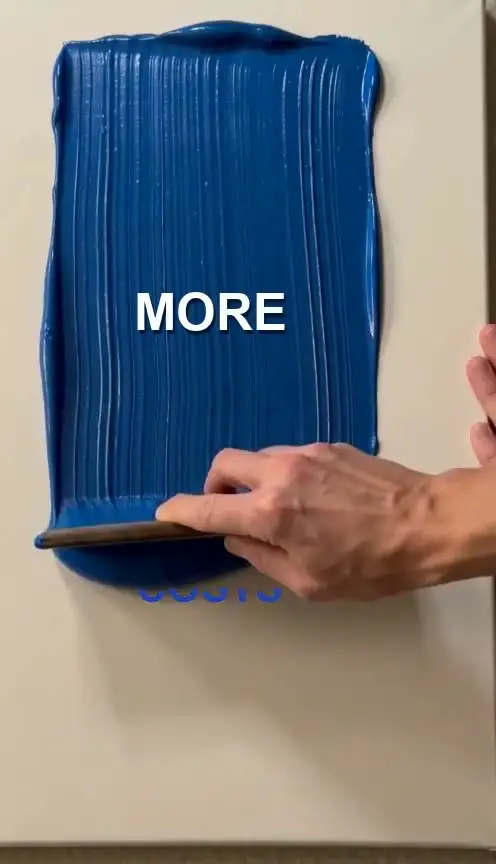
A visual is easier to reuse when you can see the original idea before reading the prompt. The BrightBean reel turns a marketing-capacity problem into a compact before-and-after: pressure to publish more consistently on one side, then “LESS AGENCY COSTS” changing to “MORE CONTENT.”
The supplied PAINT prompt deck adds the physical production logic behind the reel. It calls for thick, glossy acrylic paint, a wide flat wooden artist palette scraper, one continuous top-to-bottom pull, and copy that changes through contact with the paint. The example uses Royal Blue, #1E40AF, and a 5.0-second movement.
This page is a behind-the-scenes share. It is here for the person who sees the content, wants to understand the creative setup, and needs a practical starting point for a variation. The prompt is already prepared. You can reuse the format without having to start with a blank page.
The visual argument is simple: The first phrase names the pressure. The paint physically covers it. The second phrase appears after the movement, giving the change a visible cause instead of a generic fade between two messages.
Key Takeaway: Watch the reference first, then use the prompt to recreate the physical idea and adapt its message to your own context.
The prompt behind the ad
Here is the shareable version of the prompt from the supplied deck. Copy it as a starting point, replace the bracketed fields, and keep the physical relationships intact.
Copy-ready prompt
Create one continuous vertical ad video for [VIDEO_MODEL].

Format: 9:16 vertical, 496x864.
Quality mode: [QUALITY_MODE].

Scene and material:
Use thick, glossy [PAINT_COLOUR] acrylic paint with rich vertical ridges on a clean canvas. Use [PAINT_HEX] as the exact paint colour. A wide, flat wooden artist palette scraper is held by a right hand with a visible forearm extending continuously from the right edge of the frame.

Motion:
Make one continuous top-to-bottom vertical pull lasting [DURATION]. The scraper pushes a leading mound of paint down the canvas. Keep the hand, wrist, forearm, scraper, paint mound, and canvas connected throughout the movement.

Dual-state copy:
Start with the problem copy “[BEFORE_COPY]” in [BEFORE_COPY_COLOUR]. As the paint mound contacts each letter, submerge the words pixel by pixel into the leading paint edge. After the hand clears the frame, reveal the solution copy “[AFTER_COPY]” in glossy white on the settled acrylic texture.

Continuity and anatomy:
Maintain one right hand and a forearm that remains continuous with the right edge of the frame. Avoid floating limbs, inverted wrists, missing joints, broken scraper contact, or paint that passes behind the letters without touching them.

Keep the reveal readable, physical, and sequential. The first message disappears through contact with the paint. The second message appears only after the hand clears and the acrylic surface settles.
This is a reusable reconstruction of the supplied deck’s structure, not a claim that every field has been reproduced word for word. Its value is in making the relationships explicit: The arm connects to the frame, the scraper connects to the paint, the paint connects to the letters, and the second message follows the wipe.
Key Takeaway: The prompt is ready to customize. Start with the supplied structure, then change only the creative fields that serve your version.
Customize the parts that are meant to change
Each bracket has one clear job. Keeping the variable set small makes it easier to compare versions and understand why one generation works better than another.
| Field | Supplied example | What you can change |
|---|---|---|
| Video model | Seedance 2.0 Fast | Use the model and mode available in your workflow. |
| Format | 9:16 vertical, 496x864 | Keep the vertical composition for a social-feed clip. |
| Quality mode | Macro, realism, occlusion, or compositing pass | Choose the production question you are testing. |
| Paint | Royal Blue, #1E40AF |
Swap the colour and exact hex value. |
| Copy | “LESS AGENCY COSTS” / “MORE CONTENT” | Replace it with your audience’s pressure and intended shift. |
| Motion | Top-to-bottom pull, 5.0 seconds | Set one direction and duration. |
| Anchor | Right hand and forearm from the right edge | Keep the body connection continuous. |
The copy pair is the most important creative change. The first phrase should name a pressure the intended audience recognizes. The second should describe a direction or desired shift. Keep a result or cost claim out of the animation unless the surrounding campaign has evidence for it.
The physical spine should stay stable while you make those changes: One hand, one scraper, one continuous pull, one paint-contact event, and one clear order for the two messages. That stability is what lets the same format carry a different idea.
Key Takeaway: Change the message and surface details for your campaign, but keep the movement and contact logic stable enough for the format to remain recognizable.
Keep the reveal intact when you reuse it
The forearm instruction is more than a styling detail. The right hand and visible forearm extending from the frame edge give the video model a stable spatial relationship to maintain. Keep that language close to the hand, scraper, and motion instructions when you make a variation.
The reveal also needs a clear physical sequence. The scraper moves. The paint mound advances. The letters disappear through contact. The hand clears. The second phrase appears on the settled acrylic texture. A physical cause is easier to inspect than a general instruction to transition between messages.
Review the output in passes. First, watch the forearm, wrist, hand, and scraper. Confirm that the pull stays continuous and that the paint mound follows the tool. Second, check whether the paint actually covers the letters and whether the first phrase remains readable until contact. Finally, inspect the texture, contrast, blank space, and final copy.
| Failure mode | Likely issue | Useful adjustment |
|---|---|---|
| Detached hand or arm | The anchor is missing or far from the motion instruction. | Put the continuous right-edge forearm beside the hand and scraper description. |
| Paint passes behind the words | Contact is described like a dissolve. | State that the leading mound physically submerges each letter. |
| Messages overlap | The reveal order is unclear. | Make the first copy disappear before hand clearance and the second copy appear afterward. |
| Words are hard to read | Texture has taken priority over typography. | Increase contrast or handle final type in a deliberate post-production pass. |
The supplied deck separates movement, paint intersection, clearance, and final reveal into different shot roles. That is useful even if you are creating a single short clip. If the motion works but the words fail, revise the copy or occlusion pass rather than changing every part of the prompt.
Key Takeaway: Review anatomy first, paint contact second, and polish last. Each revision should answer an observable problem.
Adapt the idea to your own campaign
The format can carry a different argument without losing its identity. Start with the audience problem you want to express, then write a short before-and-after pair that the paint can reveal. A blank content calendar, scattered handoffs, or a difficult production bottleneck might become the first state. The second state should describe the direction your offer is designed to support.
Write the pair before changing the colour or quality mode. If the wording needs a paragraph of explanation, move that explanation into the caption or landing page. The video should make the transition easy to understand at a glance.
Change one meaningful variable at a time. You might keep the Royal Blue paint, scraper, duration, and movement fixed while testing new copy. Then test a new colour with the original copy. Save the version that works and record what changed. This gives the next variation a useful starting point.
The same approach applies if you want to use the prompt for a different visual treatment. Preserve the parts that make the reveal physical, then test the new tool, material, or timing as a deliberate change. The prompt is a creative starting point, not a guarantee that every model will render the same result on the first attempt.
For another example of a reusable visual prompt, see our text-reveal prompt template. It uses the same basic discipline: Keep timing and motion clear while leaving the campaign message open to change.
Key Takeaway: Reuse the visual format as a creative asset, but give every new message a real audience reason and review each change on its own terms.
From one BrightBean idea to more content
A shared prompt answers one production question: How can someone recreate this visual idea? A wider marketing workflow answers what to make next, how to keep it aligned with the brand, where to adapt it, and what to learn after publication.
BrightBean is building an AI-native marketing setup that coordinates research, ideation, content creation, SEO/GEO and answer-engine work, multi-channel adaptation, publishing, and performance-informed improvement around persistent brand context, with human approval and direction. Its marketing brain is designed to retain brand identity, voice, messaging, audience, visual style, previous content, and marketing learnings.
That means a prompt like this can sit inside a larger process. BrightBean can help generate ideas from brand and performance context, research audience questions and content opportunities, create and adapt social or blog content, plan and publish work, and use performance results to inform future recommendations. The intended benefit is continuity between the idea and the asset, while people remain responsible for direction and approval.
The prompt on this page gives you one useful starting point. If you want a steady source of ideas like this and a way to move them through creation, adaptation, publishing, and learning, BrightBean is designed for that wider job.
A simple reuse checklist
- Watch the reference and identify the visual action worth reusing.
- Copy the prompt and replace the colour, message, model, quality mode, or duration.
- Keep the arm anchor, scraper contact, movement direction, and reveal order intact.
- Review anatomy, paint contact, message timing, and legibility in that order.
- Save the accepted prompt and the reason for the next change.
Want to create more content from ideas like this? Explore BrightBean’s AI-native marketing setup to see how it can connect ideation, creation, publishing, and performance-informed improvement around shared brand context, with people in control of approvals and direction.
Sources
- BrightBean Instagram reel: Less agency cost. More content.: https://www.instagram.com/reel/DcywTKBOnKx/. The reference reel frames the tension between agency retainer costs and the need to publish more consistently, then points to a marketing automation system as an alternative.